3-4
Compro IP55 / 60 / 70 Network Camera
Mounting the Camera
If you want to mount the camera on the wall or ceiling, please use the screws to fix the bracket to a flat
surface. After the bracket is fixed to a flat surface, please try to adjust the camera to the desired viewing
angle. Follow the steps below to mount the camera.
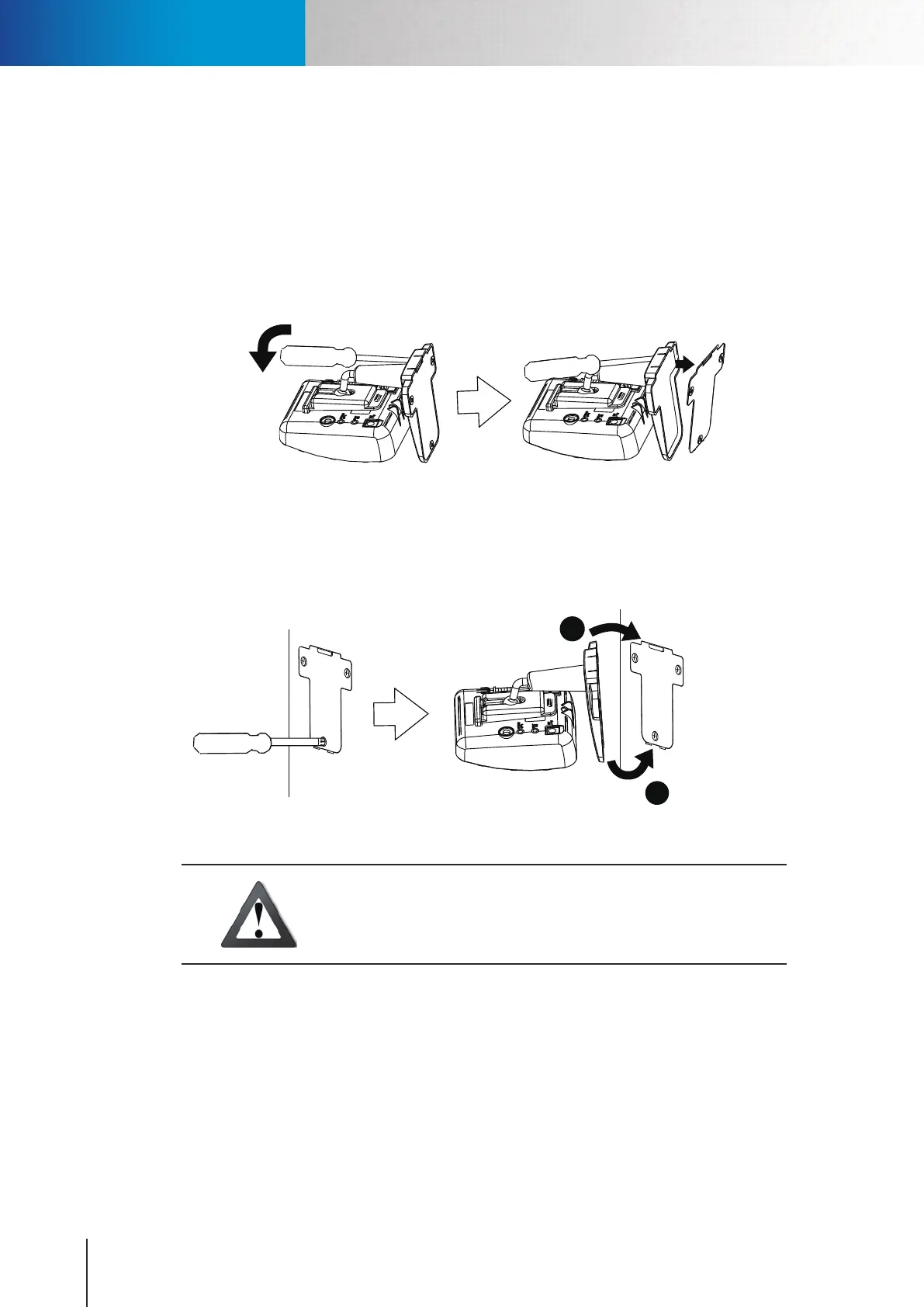
Step 1: Detach the metal mounting plate from the base of mounting bracket by inserting a flat blade
screwdriver into the rectangular hole seen on the wide end of the bracket base and then pressing the
screwdriver downward.
Figure 3-4. Detaching mounting plate
Step 2: Place the side of the mounting plate that has protruding screw holes against the mounting surface.
Screw the mounting plate into the mounting holes on the mounting surface. And secure the bracket
to the mounting plate by clicking the plate into its position, as shown in the point 1 and 2 of the
gure below.
OK
2
1
Figure 3-5. Mounting the camera
Caution!
If the power cable and the network cable connected to the camera
are not securely fastened (as shown below), it could lead to unstable
connection.
Mounting the Camera



 To Next Page