9-4 Trouble with the ActiveX Client
Compro IP55 / 60 / 70 Network Camera
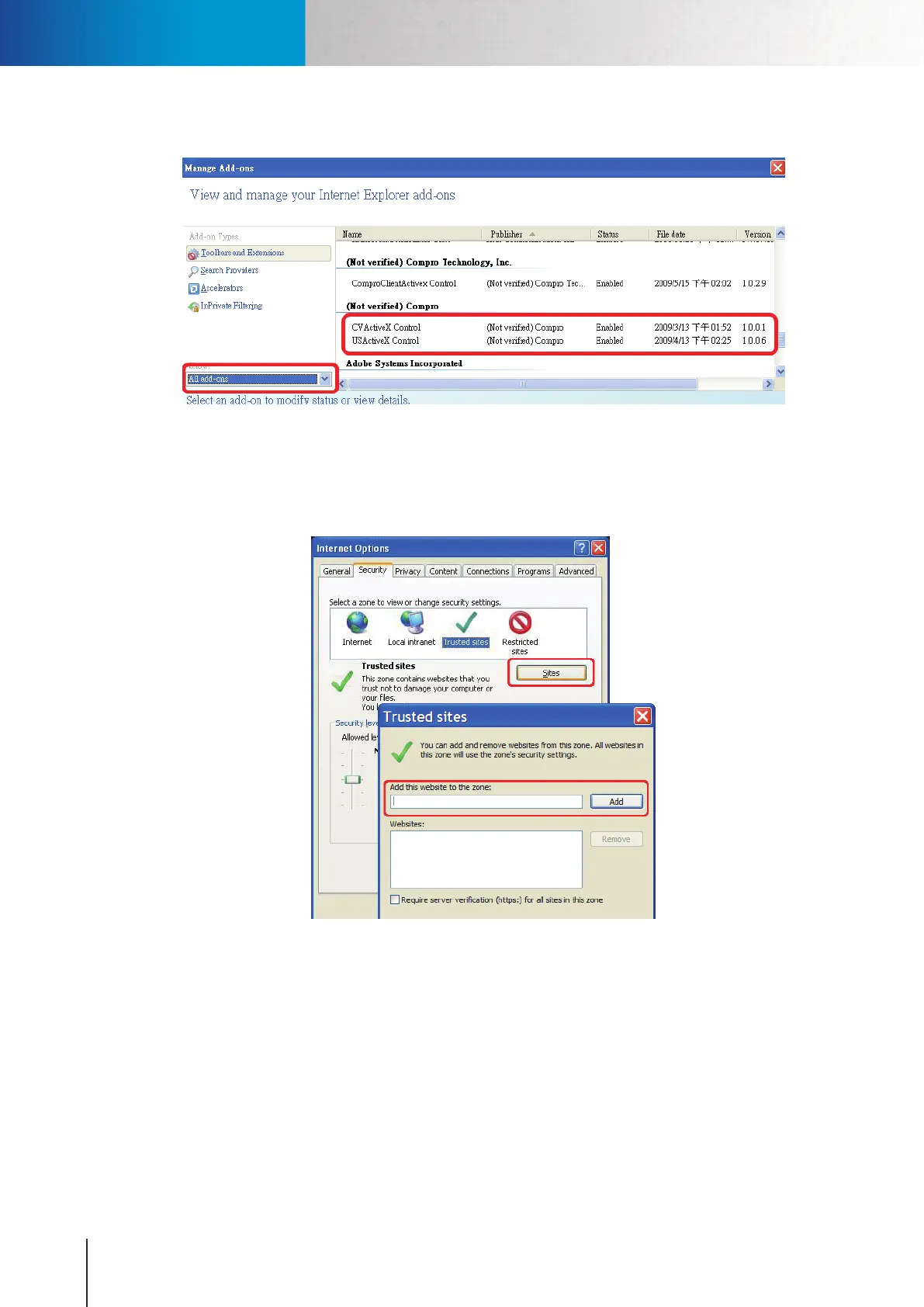
Figure 9-6. Add-on management
c. Inappropriate browser security setting: Please ensure that your security setting in Internet Explorer
allows the installation of ActiveX component by adding the IP address of the camera to the list of
trusted sites in Internet Explorer.
Figure 9-7. Browser security setting
If you’ve gone through all of the above steps but are still unable to obtain video/audio on the browser, please
closeallthebrowserwindowsanddeletethe"ComproEmbedded"folderfoundunder"(OSDrive):\Program
Files".(Ifyou'reusing64-bitwindows,lookfor"(OSDrive):\ProgramFiles(x86)".)Andopenyourwebbrowser
and log in to the IP camera again to reinstall the ActiveX client. Finally, if you encountered the error where the
browserreturns“213lenotfound”,pleaserestartyourcomputer,whichshouldhelpinthissituation.



 To Next Page