Statox 503 Control Module
Issue 10 / 2018 Page 25 of 46
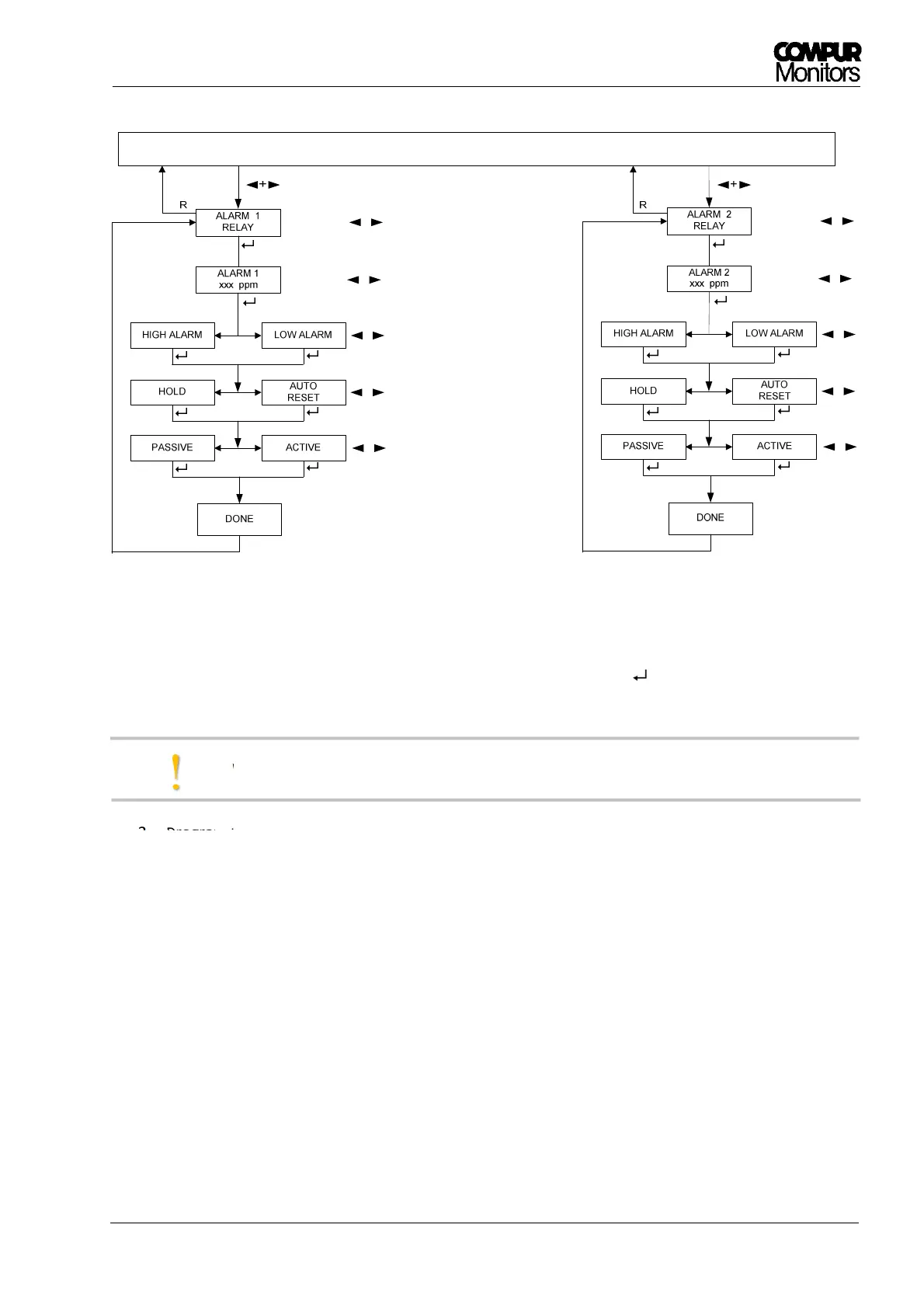
Figure 17: Control Module - alarm relays setting
1. Enter the menu „ALARM 1 RELAY“ or „ALARM 2 RELAY“ by pushing .
The procedure is identical for both relays.
With the next alarm the new settings will be effective.
2. Program the alarm threshold with ◄ or ►. Push and hold ◄ or ► button for speed mode.
3. Confirm with Enter.
4. Select an alarm type with ◄ or ►.
5. Confirm with Enter.
6. Select a Reset-setting (latching or non-latching) with ◄ or ►.
7. Confirm with Enter.
8. Select a relay setting with ◄ or ►.
9. Confirm with Enter.
10. Display „DONE“ for 2 seconds.
11. The program returns automatically to the main menu.
12. Push Reset to return to the measuring mode.
!
MEASURING MODE


 To Next Page