Option Programming Instructions
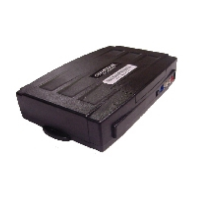
Option Programming Using the OP500 (programmer)
The OP500 can be used to program any available option. It is required to program options in Special
Option Groups 1 and 2.
STEP 1: Make sure system is unlocked/disarmed. Using the blue connector on the top of the
OP500, connect it to the control module via the antenna wire. (Use the included extension cable if
necessary.) Once connected, the OP500 will power up as long as the main harness to the controller
has been connected properly.
STEP 2: To change the option number you wish to program, use the left and right arrow keys on the
OP500. It will scroll through the options available in menu 1 and then move to menu 2. Use the up
and down arrow buttons on the OP500 to adjust the option settings; “1” is the default setting, and
“2”, “3”, and “4” are the optional settings.
At the end of menu 2, if diesel mode or auxiliary setting functions were enabled – or if any of the
auxiliary outputs were set to “Program”, the duration of these settings can now be adjusted.
Following the auxiliary and diesel settings (if selected), the POC options will be displayed on the
OP500. The POCs can be set between 0 (default) to 8.
STEP 3: When finished with the adjustment of the various option settings, press and hold the “W”
(write) button until the OP500 chirps, which is approximately 2.5 seconds. This will write the settings to
the control module. Wait until the module displays “Success” before disconnecting it from the antenna
cable.
To reset the options, hold the “R” (reset) button and the “W” (write) button for 2.5 seconds. Release
then “W” write in the reset, hold the “W” button until the OP500 chirps, which is approximately 2.5
seconds.
TM
19 | Copyright 2011 Firstech, LLC.
Programming
DR-2000 Install Guide


 To Next Page