21
Watching video
footage
21
Regarding event recording
• 7KHUHDUHWKUHHGDWDW\SHVRIHYHQWUHFRUGLQJLPSDFWUHFRUGLQJGDWDWRUHFRUGD¿OHDW
WKHWLPHZKHQGHWHFWLQJDQLPSDFWPDQXDOUHFRUGLQJGDWDWRUHFRUGD¿OHDWWKHWLPH
when the switch is operated, and "parking surveillance impact recording data" to record
D¿OHDWWKHWLPHZKHQDQLPSDFWLVGHWHFWHGXQGHUWKHSDUNLQJVXUYHLOODQFHPRGH
• By default, when the maximum data capacity is reached, the oldest video footage is
deleted in chronological order, and then new video footage is continued to be recorded.
• Changing the setting to [Overwriting prevention] does not delete the old video footage
and allows stopping the recording as well. (=> P 50)
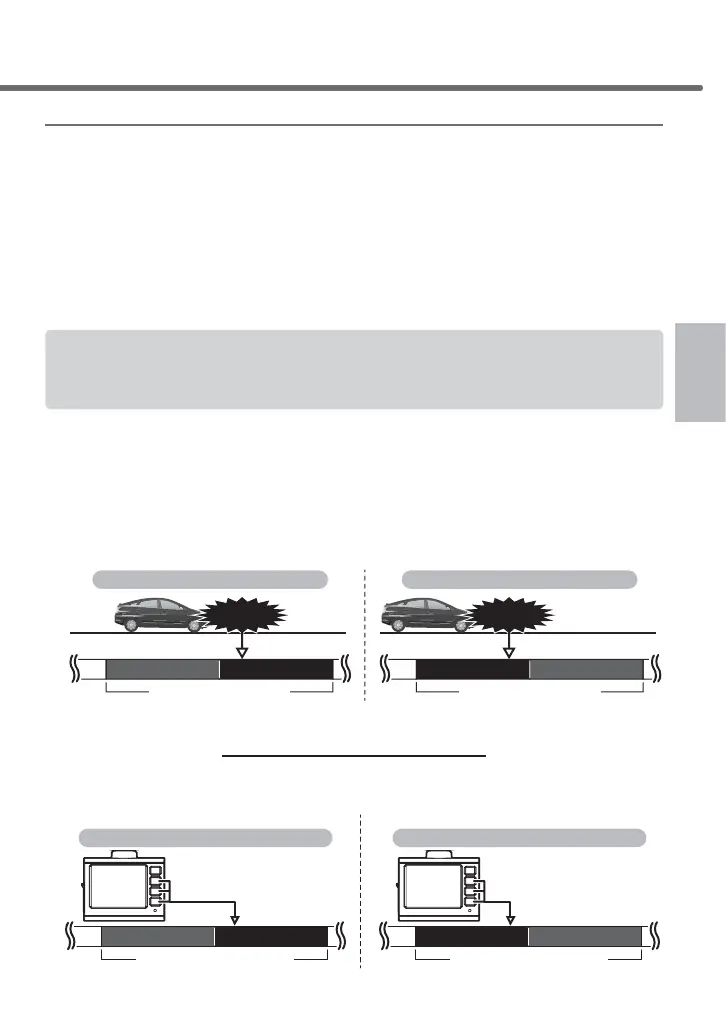
7KHHYHQWUHFRUGLQJDOORZVWKHSUHYLRXV¿OHWREHUHFRUGHGDVHYHQWUHFRUGHGGDWDZKHQDQ
LPSDFWLVGHWHFWHGRUWKHVZLWFKLVRSHUDWHGZLWKLQRIWKH¿UVWSDUWRIRQH¿OHDQGWKHQH[W
¿OHZKHQDQLPSDFWLVGHWHFWHGRUDVZLWFKLVRSHUDWHGZLWKLQRIWKHODWWHUSDUWRIWKH¿OH
ŶImpact recording data
• When the G sensor detects an impact which is equal to or more than the
VHWYDOXHWKLVSURGXFWUHFRUGVD¿OHDWWKHWLPHZKHQWKHLPSDFWLVGH-
WHFWHGDQGWKHSUHYLRXVRUQH[W¿OHDVLPSDFWUHFRUGLQJGDWD
• The sensitivity of the G sensor can be adjusted individually for the front/
back, left/right, top/bottom by 0.1 G via the settings.(=> P 51)
1 file1 file
Impact
Recording as impact recording data
When an impact is detected within 2/3 of the latter part When an impact is detected within 1/3 of the first part
1 file1 file
Impact
Recording as impact recording data
ŶManual recording data
Pressing a switch other than the [Menu/Return] switch of this product
UHFRUGVD¿OHDWWKHWLPHZKHQWKHVZLWFKLVRSHUDWHGDQGWKHSUHYLRXVRU
QH[W¿OHDVPDQXDOUHFRUGLQJGDWD
1file1file
Records as manual recording data
When operating the switch within 2/3 of the latter partWhen operating the switch within 1/3 of the first part
1file1file
Records as manual recording data
Press any switch other than
[Menu/Return]
Press any switch other than
[Menu/Return]
Shooting video footage



 To Next Page