44
Setting method
The settings of this product can be changed from the main menu of the main unit.
The entire microSDHC card contents will be reformatted when the [Automatic re-
cording], [Recording size], [Frame rate], [Image quality], [Event recording area] set-
tings are changed. Make sure that the necessary data is saved on your computer.
Operation method on the settings screen
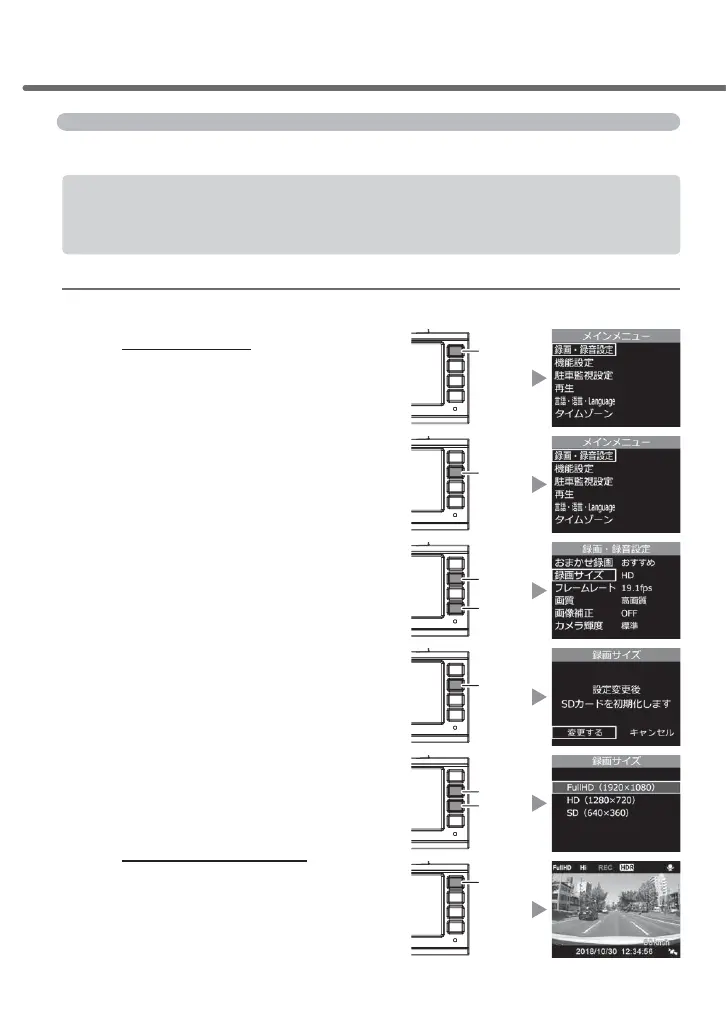
Example: How to change the recording size settings to [FullHD (1920 x 1080)]
1.
Press and hold [Menu/Return]
to display the [Main menu] of the
settings screen
2.
As [Picture/sound recording settings]
has been selected, click [OK]
3.
Press [Down] once to select
[Recording size] followed by
clicking [OK]
4.
7KHUHIRUPDWWLQJFRQ¿UPDWLRQVFUHHQ
of the SD card is displayed. Click
[OK] if you would like to reformat it
5.
Press [Up] once to select [FullHD
(1920x1080)] and click [OK]
6.
Pressing and holding [Menu/
Return] will go back to the
recording screen after going
through the settings screen.
- It is also possible to set other items without
going back to the recording screen.
Setting
OK
Menu
/ Return
OK
Down
OK
OK
Up
Menu
/ Return



 To Next Page