27
Watching video
footage
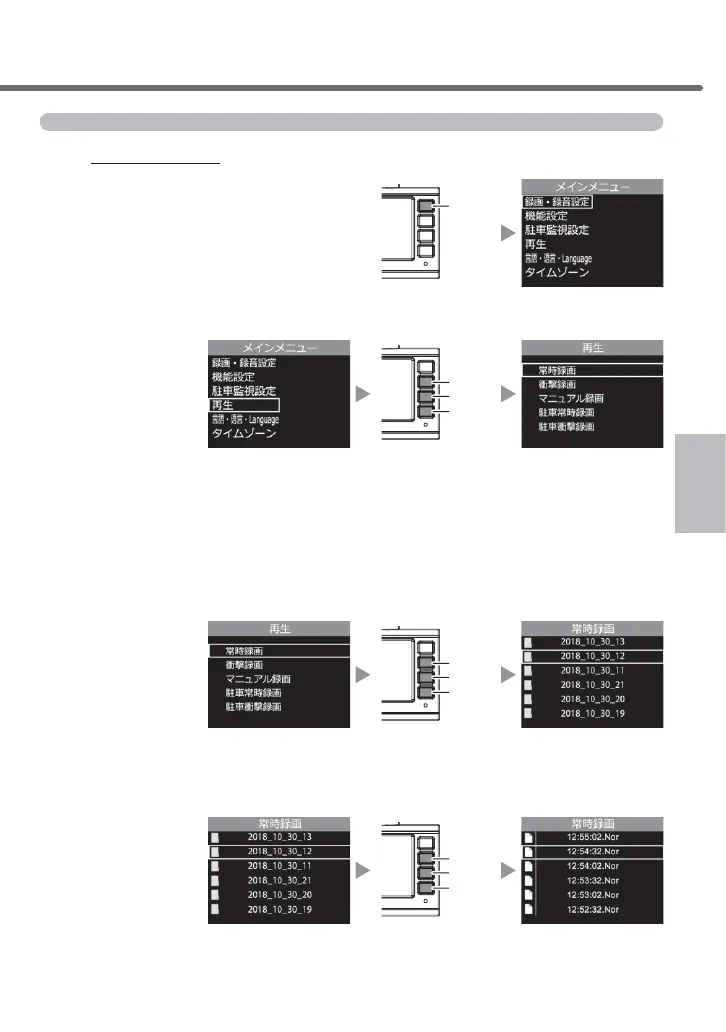
Playing video footage with the main unit
1.
Press and hold [Menu / Return] and display the main menu.
Menu
/ Return
2.
Select [Play] by pressing [Up] or [Down], and then press [OK].
OK
Up
Down
3.
Select the video footage type by pressing [Up] or [Down], and then press [OK].
• [Continuous recording] ...Displays the continuously recorded data.
• [Impact recording] ..........Displays the data recorded by impact detection.
• [Manual recording] .........Displays the data recorded by switch operation.
•[
Parking continuous recording
] ...
Displays the data recorded by parking surveillance mode.
•[
Parking impact recording
] ...Displays the data recorded by impact detection during
parking surveillance mode.
OK
Up
Down
4.
Select a folder by using
[Up] or [Down]
, and then press [OK].
* The main unit displays a folder name based on the recorded date and time and a
¿OHQDPHEDVHGRQWKHUHFRUGHGKRXUPLQXWHDQGVHFRQG
OK
Up
Down
Watching video footage



 To Next Page