31
Watching video
footage
Playing video footage on a personal computer
The video footage recorded by this product can be watched together with in-
formation such as vehicle acceleration by installing dedicated viewer software
which can be downloaded from our website. In addition, since the recorded
GDWDLVVWRUHGDVD029¿OHLWFDQEHSOD\HGXVLQJ:LQGRZV0HGLD3OD\HUHWF
Advice
・
:HUHFRPPHQGDSHUVRQDOFRPSXWHUWKDWPHHWVWKHIROORZLQJVSHFL¿FDWLRQVZKHQXVLQJ
the viewer software.
OS: Japanese version of Windows 7 / 8.1 / 10
CPU: Core 2 Duo processor 2.8 GHz or higher recommended
Memory: 4 GB or higher recommended
Monitor resolution: SXGA (1280 x 1024 pixels) or higher recommended
* Except a tablet-type personal computer
・
:KHQWKHYLHZHUVRIWZDUHGRHVQRWRSHUDWHSURSHUO\RZLQJWRWKH 3&V RSHUDWLQJ V\VWHP
being updated, download and try the latest version of the viewer software from our website.
Before using viewer software
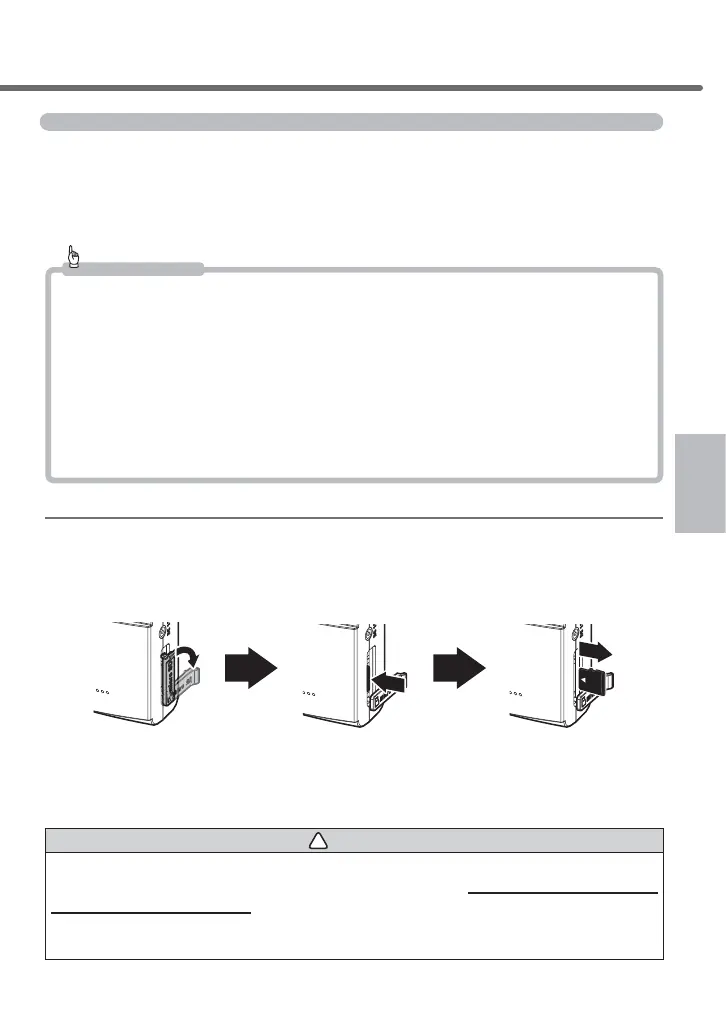
5HPRYHWKHPLFUR6'+&FDUGIURPWKHPDLQXQLW:KHQUHPRYLQJWKHFDUGWXUQRႇWKHPDLQXQLWV
SRZHUVRXUFHVZLWFKDQGWKHQFKHFNWKDWWKH/('RIWKHPDLQXQLWLVWXUQHGRႇWRUHPRYHWKHFDUG
- To take a microSDHC card out, push the card gently once, then take it out as it pops out a little.
7RLQVHUWWKHFDUGSXVKLWLQXQWLODFOLFNVRXQGLVKHDUG
then pull it out when
it pops out slightly.
Lightly push the
microSDHC card,
Pull the cover forward
and fold it horizontally.
* Insert the card by following the steps for ejecting in reverse order. Ensure that you insert the microSDHC card
so its logo can be seen at the side of the camera. If you try to insert it upside down by force, it will break.
!
Caution
Do not insert/remove the micro SDHC card while this product is under operation (including during parking sur-
veillance mode). Doing so may damage the card or recorded data in the card. Before inserting/removing the card,
DOZD\VWXUQRႇWKHYHKLFOHNH\VZLWFKDQGWKHQFKHFNWKDWWKH/('RIWKLVSURGXFWLVFRPSOHWHO\WXUQHGRႇ
* If the parking surveillance mode is active, inactivate the parking surveillance mode referring to page 59, and then
remove the card.
Watching video footage



 To Next Page