30
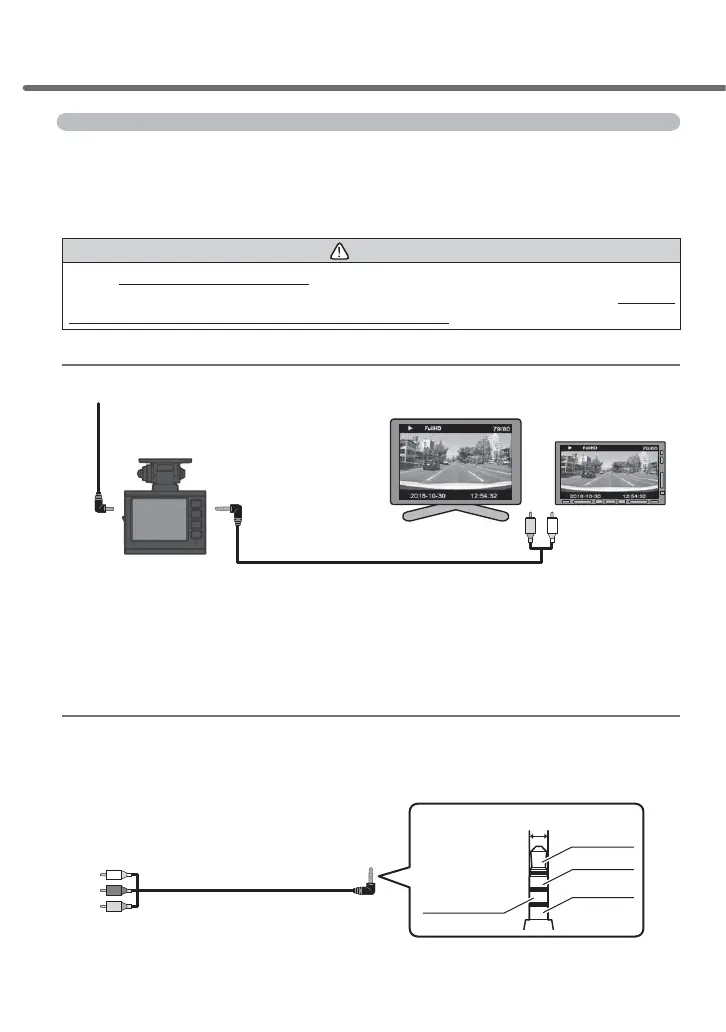
Play video footage on a television
Connecting this product to a television or a navigation device equipped with
a video input terminal using a separately sold optional AV cable can display
the LCD display of the main unit on a television or navigation device.
* This product outputs video footage using the NTSC system.
Caution
Do not insert/remove the AV cable with the power source turned ON. Doing so may lead
to unstable operation of the main unit such as restarting. Always check that the LED
ODPSLVWXUQHGRႇDIWHUWKHSRZHUVRXUFHLVWXUQHG2)) to insert/remove the AV cable
Video footage playing method
AV cable (sold separately)(About 2 m)
[Part number: VC-100]
Power source cords including the attached cigar
plug cord and TV AC adapter (sold separately)
External input terminal
(Yellow/White)
Connection terminal
for televisions
■
Video image playing method
■
Configuration diagram of connections
①②
1
)
Connect the AV cable (part number VC-100) (sold separately) to the main unit's television connection terminal (Fig. 1)
2
)
Connect the power source cords including the attached cigar plug cord and TV AC adapter (sold separately) to the power jack of the main unit. (Fig. 2)
3
)
Operate the main unit by following the procedures on pages 27-28 to play the recorded video footage.
(The video footage will be displayed on the connected monitor. *No screen is displayed on the LCD of the main unit)
Navigation /
Car-mounted monitor
Television
When using a commercial AV cable
7KHVSHFL¿FDWLRQVRIDSROHPLQLSOXJWHUPLQDOIRU$9FDEOHVZKLFKFDQEH
used with this product are as shown in the illustration below.
%HVXUHWRXVHDQ$9FDEOHFRQIRUPLQJWRWKHVSHFL¿FDWLRQVEHORZ
RCA terminal
*Audio (red) is not used as audio
output of this product is monaural.
4-pole mini plug terminal
GND
(common shielding)
Audio (white)
Φ
3.5
Video (yellow)
Audio (red)
Watching video footage



 To Next Page