18
Checking the operation
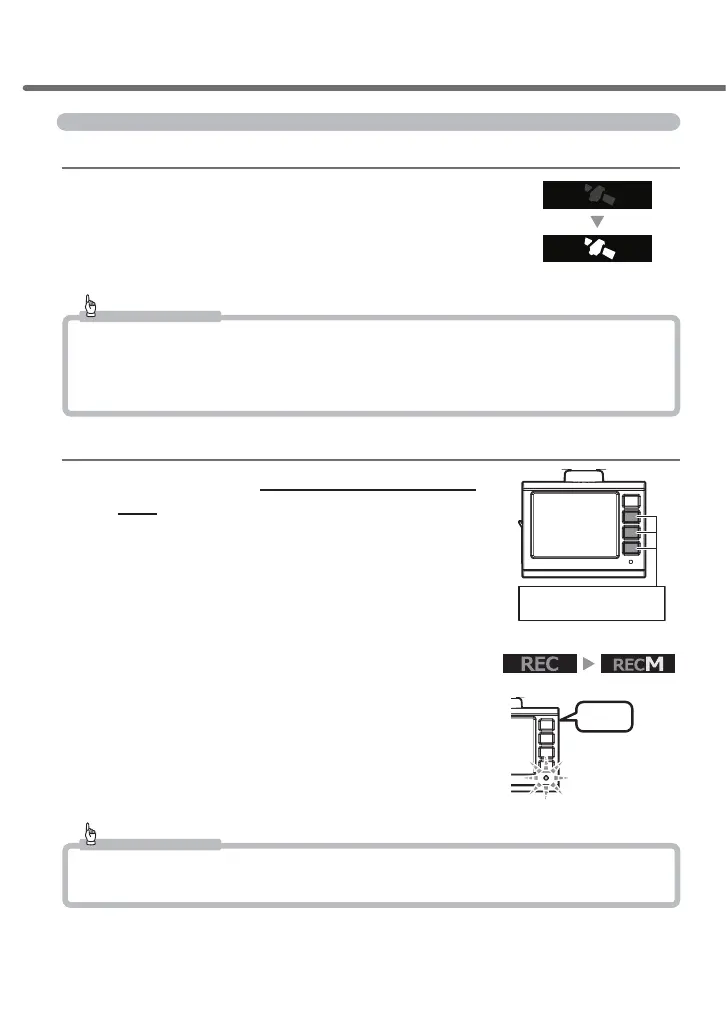
1. Checking the GPS reception
1) Turn the vehicle key switch on. Start up the
main unit and then check that the GPS icon is
displayed.
* Receiving GPS sets the date and time in the main unit.
Advice
The GPS function of this product does not operate at places listed below, where a signal from satellites cannot
be received. This will cause the display of the GPS function to not operate properly. Move to another location
and check if the GPS function is working. (Places include: tunnels, underpasses, the inside of buildings, places
surrounded by buildings, etc., places under elevated railway tracks, forests, etc.)
2. Checking the operation of manual recording
1)
Press the switch other than the [Menu/Re
-
turn] switch while the green LED lamp is lit and
the radio or audio on.
2)
A beep sound will be generated. [REC] display
turns to [REC M] and recording of the sound
and video starts.
* The green LED is lit during manual recording.
* Sound is automatically recorded.
Advice
The setting for recording is [ON] as the default. This can be switched to [OFF].
(=> P 49)
Press any switch other
than [Menu/Return]
Icon display will change
LED lamp flashing
in green
Blip
Installation method



 To Next Page