9
Introduction
Introduction
When using a brand new microSDHC card
Whenever using a brand new microSDHC card and other microSDHC cards
other than the one that comes included, you need to format the SD card
IURPWKHFRQ¿JXUDWLRQPHQXRIWKHPDLQXQLW !3
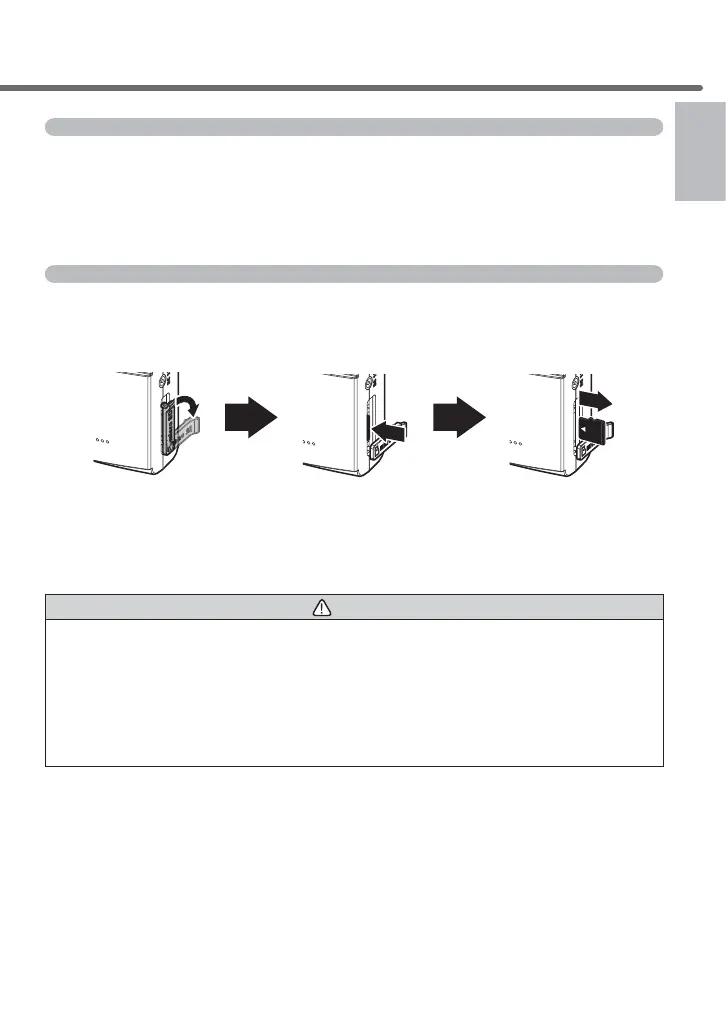
5HJDUGLQJHMHFWLQJDPLFUR6'+&FDUG
When you want to take a microSDHC card out, push the card gently once,
then take it out as it pops out a little. When inserting the card, press it in until
a ‘click’ sound is heard.
then pull it out when
Lightly push the
Pull the cover forward
and fold it horizontally.
* Insert the card by following the steps for ejecting in reverse order. Ensure that you
insert the microSDHC card so its logo can be seen at the side of the camera. If you
try to insert it upside down by force, it will break.
Caution
Do not insert/remove the micro SDHC card while this product is under operation
(including during parking surveillance mode). Doing so may damage the card or
WKHUHFRUGHGGDWDLQWKHFDUG%HIRUHLQVHUWLQJUHPRYLQJWKHFDUGDOZD\VWXUQRႇ
the vehicle key switch, and then check that the LED of this product is completely
WXUQHGRႇ
* If the parking surveillance mode is active, inactivate the parking surveillance
mode by referring to page 59, and then remove the card.



 To Next Page