23
Watching video
footage
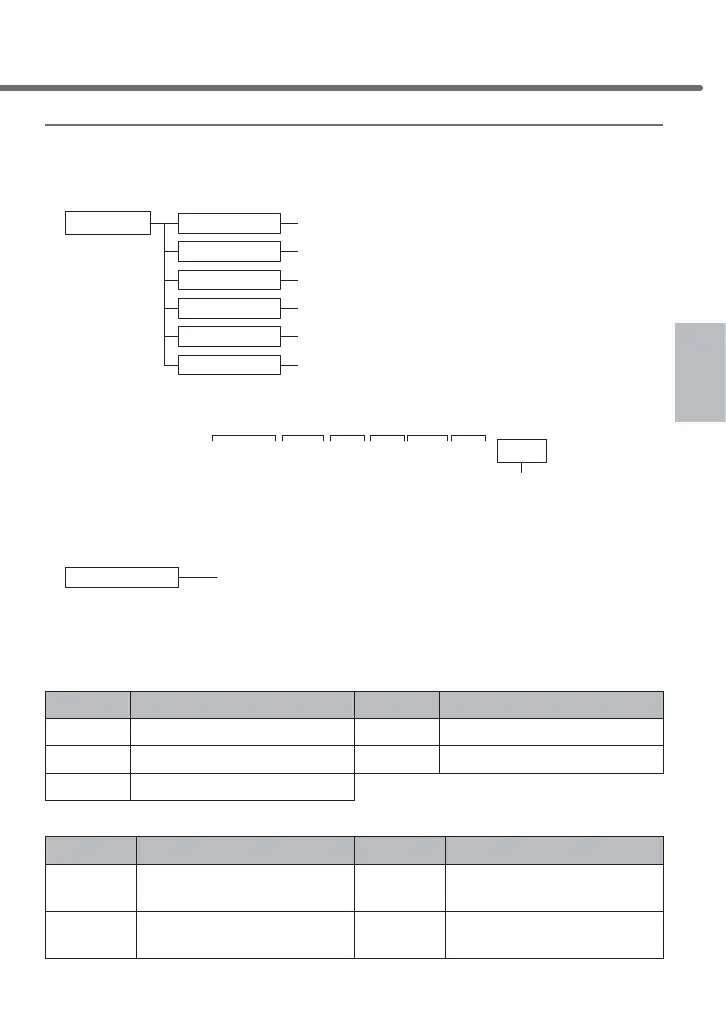
Regarding the saving destination folder name¿OHQDPH
7KHGDWDUHFRUGHGE\WKLVSURGXFWLVVWRUHGDVD¿OHQDPHEDVHGRQWKHGDWHZKHQLWLV
started to be recorded and the type of the recorded data into the folder of each item.
● Folder configuration
UPDATE
PNORMAL
PGSENSOR
MANUAL
GSENSOR
NORMAL
Save all recorded data
Only save impact recording data within event recording data
Only save manual recording data within event recording data
Used when updating the software of the main unit
Save all recorded data while in parking surveillance mode
Only save impact recording data while in parking surveillance mode
SDcard
Example) Names of the folder and file in which continuous recording commenced on 2019/10/30 17:23:45
20191030172345Nor.MOV
20191030172415Nor.MOV
20191030172445Nor.MOV
・
・
・
NORMAL
● The folder name is saved with the content below
Second
Minute
Hour
YYYYMMDDhhmmssXXX.MOV
DayMonthYearRecording has started
Recorded data type
*
* Recording is based on the time zone settings including date and time, and
daylight saving time settings (the time and date information displayed on the main unit.)
Ŷ5HJDUGLQJGLVSOD\RIUHFRUGHGGDWDW\SHV
Display Content Display Content
Nor Continuously recorded data Gsn Impact recorded data
Man Manually recorded data P_Nor
Parking surveillance continuously recorded data
P_Gsn
Parking surveillance impact recorded data
* In addition, the following items may be added depending on the recording situation.
Display Content Display Content
Restore Restored data c
'DWDIRUZKLFKUHFRUGLQJZDV¿QLVKHGRZLQJ
to an error caused by high or low temperature
SDExit
Data for which the power source
ZDVWXUQHGRႇZKLOHUHFRUGLQJ
s
'DWDIRUZKLFKUHFRUGLQJLV¿QLVKHGE\
the emergency recording stop function
Shooting video footage



 To Next Page