37
Watching video
footage
Saving the recorded data as still images
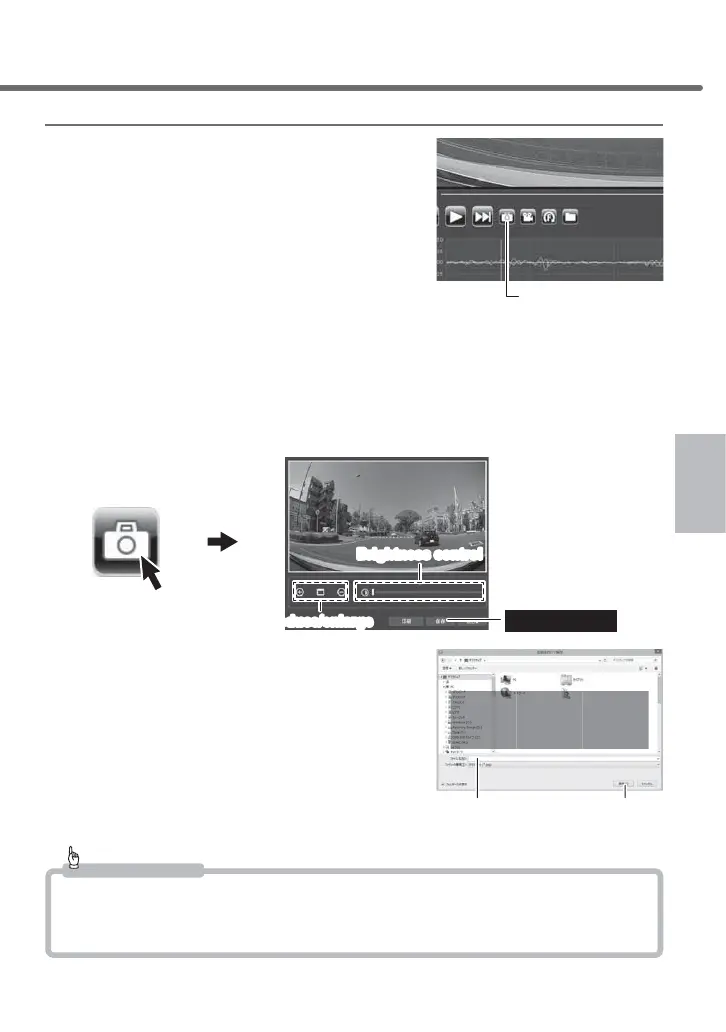
1) Press the [Still image] button in the view-
er software.
2) After the output screen is displayed, press [Save].
・
Moving the slide bar enables adjusting the brightness of the image to be saved.
・
The scaling button is for how the image is displayed. For printing or saving, the
image is saved/printed out at the original size. Pressing the button located at the
center changes the size to the original size.
Press [Save]
Brightness control
Reduce/enlarge
■Output screen
3) Enter the file name after selecting the
save destination for the still image, and
then press [Save].
Advice
・
Pressing the [Still image] button and then [Print] allows direct printing of the still image.
・
Only video footage is saved or printed out. The date, time, and acceleration are not
printed out.
Still image button
(1) After selecting the
saving destination,
(2) Enter the file name, and (3) Press [Save](2) Enter the file name, and (3) Press [Save]
Watching video footage



 To Next Page