16
LEVEL II. preset workouts & recall
a. setting up workouts
It is easy to set up a variety of workouts on your PM2. Specifically, you can set up:
• asingleworksessionofpresettimeduration
• atimedintervalworkout(alternatingworktimeandresttime)
• asingleworksessionofpresetdistance
• adistanceintervalworkout(alternatingworkdistanceandresttime)
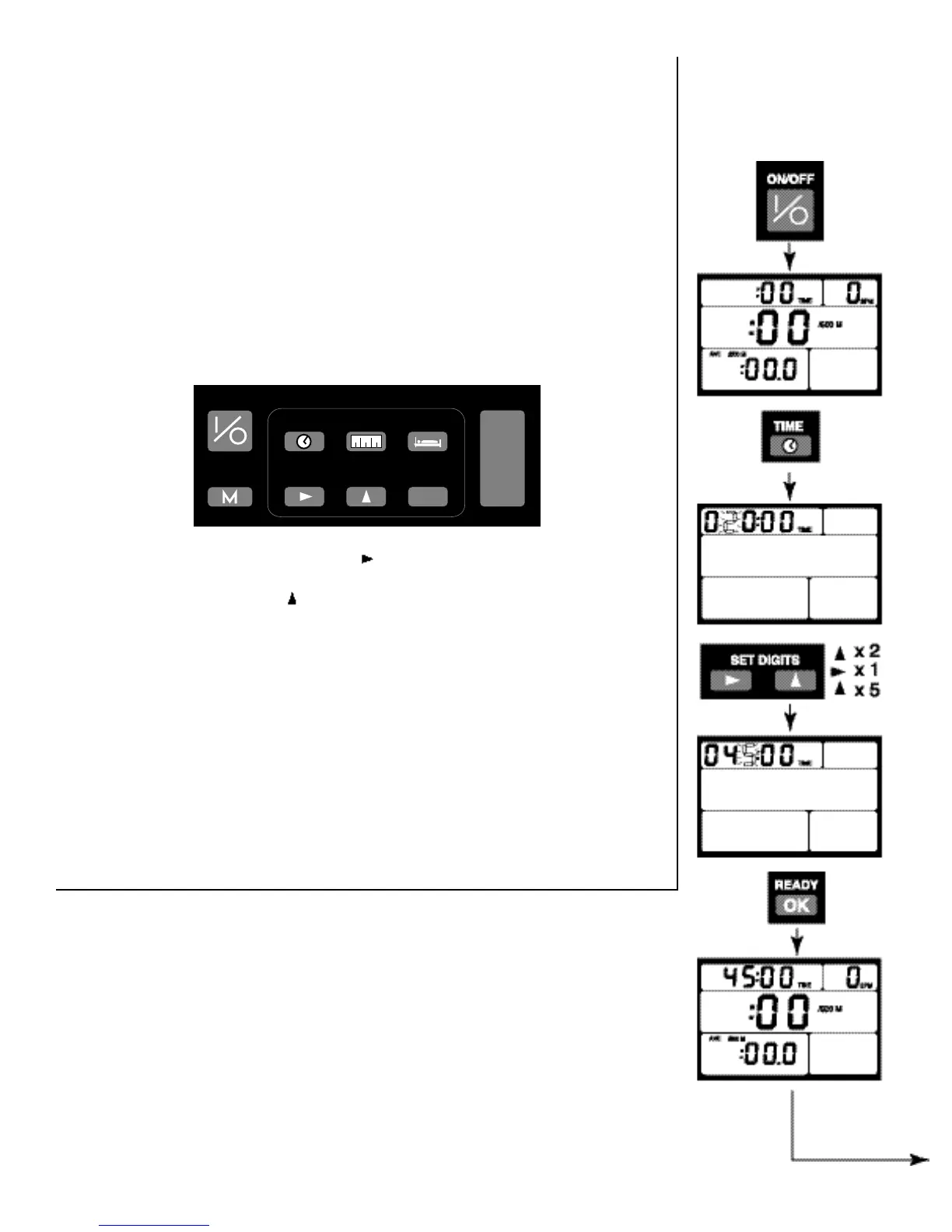
All of these types of workouts can be set up using these buttons:
Example #1:
PRESET TIME
45 minute row
B. Sample Workouts:
The sample workouts on these two pages are designed to help you
become familiar with this capability of your PM2. We encourage you
to set them up on your own PM2 as you read through the instructions.
They are also good workouts to try once you have learned proper rowing
technique and built up your time rowing on the Indoor Rower.
Projected Finish Display: when you are rowing one of these pre-set workouts, you
will have an additional display option in the lower left field: Projected Finish Time or
Distance. If you are rowing a preset distance, this display will show you your project-
ed finish time if you keep up your present pace. If you are rowing a preset time, this
display will show your projected finish distance if you keep up your present pace. To
see Projected Finish, simply press the DISPLAY button to cycle through the options
until the word “PROJ” is displayed above the time or distance.
RECALL
ON/OFF
DISPLAY
SET DIGITS
REST
READY
TIME
METERS
OK
/500 m
WATT
CAL
� �
▲ ▲
▲▲
REST:Press this
button to set the
rest time for an
interval workout.
▲
METERS: Press
this button to set
the distance dur-
ation of a work
piece or distance
intervals.
TIME: Press
this button to set
the time duration
of a work piece or
work intervals.
▲
READY: Press this
button when you
have finished setting
up your workout and
are ready to row.
▲
SET DIGITS: Press this button to
move right to the next digit when setting
time or distance for workouts.
Press this button
to increase the
value of the blinking digit when setting
time or distance for workouts.
▲
RECALL: After
you have finished
a workout, you can
use RECALL to view
your performance.
ON/OFF: Press
this button to turn the
PM2 on or off. The
PM2 will come on
automatically when
you start to row and
will turn itself off
after 4 minutes of
inactivity.
DISPLAY:You can
press this button at
any time before,
during or after your
workout to change
yo ur ch oi ce of
display units. These
choices include:
•averagepace
• p r o j e c t e d
meters or time
•elapsedmeters
or time
•watts&calories


 To Next Page