SONAR
Sensitivity
Sensitivity determines how echoes will be displayed on the screen.
Increasing the sensitivity will make you see more details on the screen. In such situations
when you see too much clutter on the screen, decreasing the sensitivity will play an effect.
The larger the sensitivity is, the more relatively strong sonar returns the screen will display.
If the sensitivity is decreased too low, most sonar returns (which maybe fish) will not be
displayed.
In situation where water is clear or very deep, try increasing the sensitivity, which will let
you see even the very weak returns. However in situation while water is turbid, try
decreasing the sensitivity, which will make only the useful echo be showed on the screen
and the noise will be omitted.
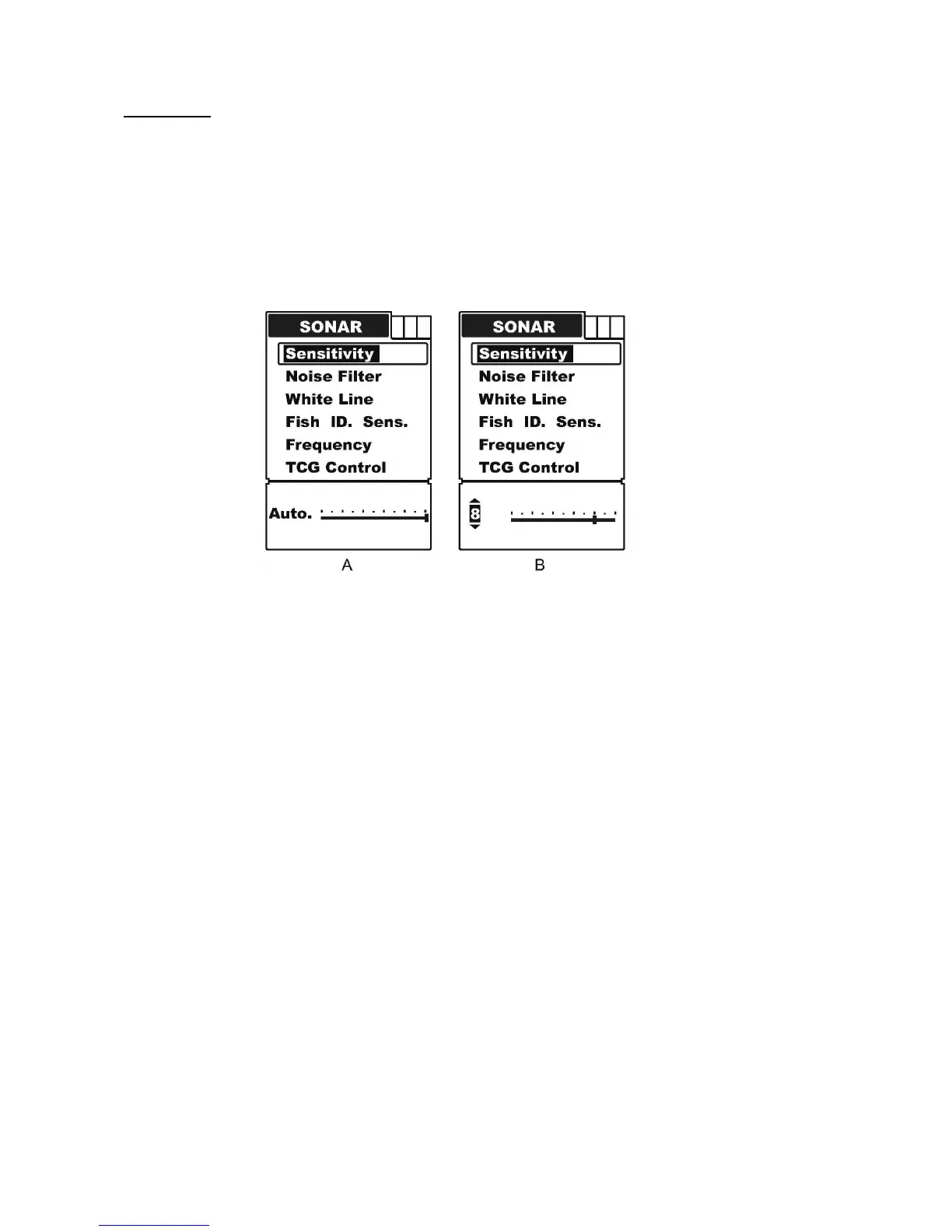
To set the Sensitivity:
a) Press MENU to enter into menu setting.
b) Repeatedly press MENU to switch to Sonar menu.
c) Use the Up / Down Arrow to select Sensitivity option.
d) Press ENT to enter into setting.
e) Use the Up / Down Arrow to increase / decrease the value.
f) Press ENT to confirm and exit the setting.
Note: the default setting is “Auto”, and the menu display will change from figure A to B as
soon as entering menu setting.


 To Next Page