TCG Control
This function is optimized fog high power-output sonar system. It could help the sonar work
properly in a noisy environment.
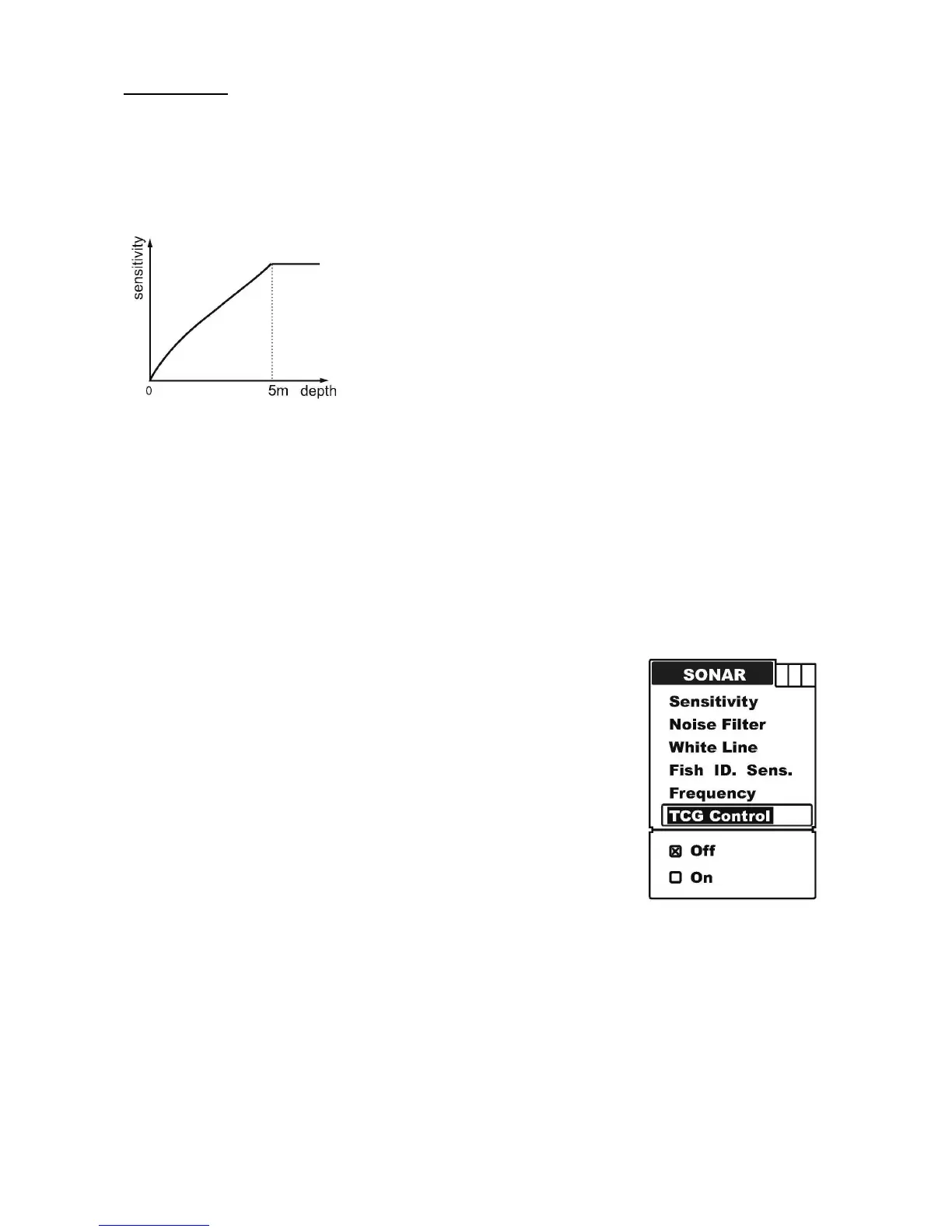
In order to control the surface noise and the self-ring of the transducer, it changes the
sensitivity automatically at the depth’s changes. The diagram below shows the sensitivity
changes according to depth.
Note: from the diagram, we can see that the TCG function only controls the signal
between 0 and 5 meters. So, if the environment is noisy, and you wish to see the
underwater conditions in the shallower layer near 0-5 meters, you have to set the TCG
control “On”.
Note: in air, the signal consumption is much bigger than in water. So, if you try to test the
sonar sensitivity in the air, you have to set the TCG Control “Off”.
To set the TCG Control:
a) Press MENU to enter into menu setting.
b) Repeatedly press MENU to switch to Sonar menu.
c) Use the Up / Down Arrow to select TCG Control option.
d) Press ENT to enter into setting.
e) Use the Up / Down Arrow to select the option.
f) Press ENT to confirm and exit the setting.


 To Next Page