Copyright © 2013, Condor Instruments Ltda. 74
Av. Brigadeiro Luis Antonio, 551, cj 124 - Cep:01318-000
Copying the Database
The ActStudio is portable and it means you can run it without the need of
installation (actually, you can run it from a pen drive), but the database is stored
on your computer, not inside the ActStudio folder, so if you copy the ActStudio
folder to another computer the logs you saved will not be available.
To solve this issue you need to export the database and import it on the new
computer. You can easily do that using the Database Menu explained in the
previous topic. The database is a file called ActStudio.db and when you export
it you can save it to a pen drive or any other device as well as the ActStudio
folder. The exported file is a copy of the local database, not the database itself,
so the local database will not be changed.
If you want to use the data on another computer you just need to import the
database file using the Database Menu. If the computer already has an
ActStudio database the new data imported will be inserted into the existing
database. Doing this all logs that you have stored will be available on the other
computer.
Language Selection
If your operating system is in Portuguese, the ActStudio will automatically
choose this language as default, otherwise, it will select the English language.
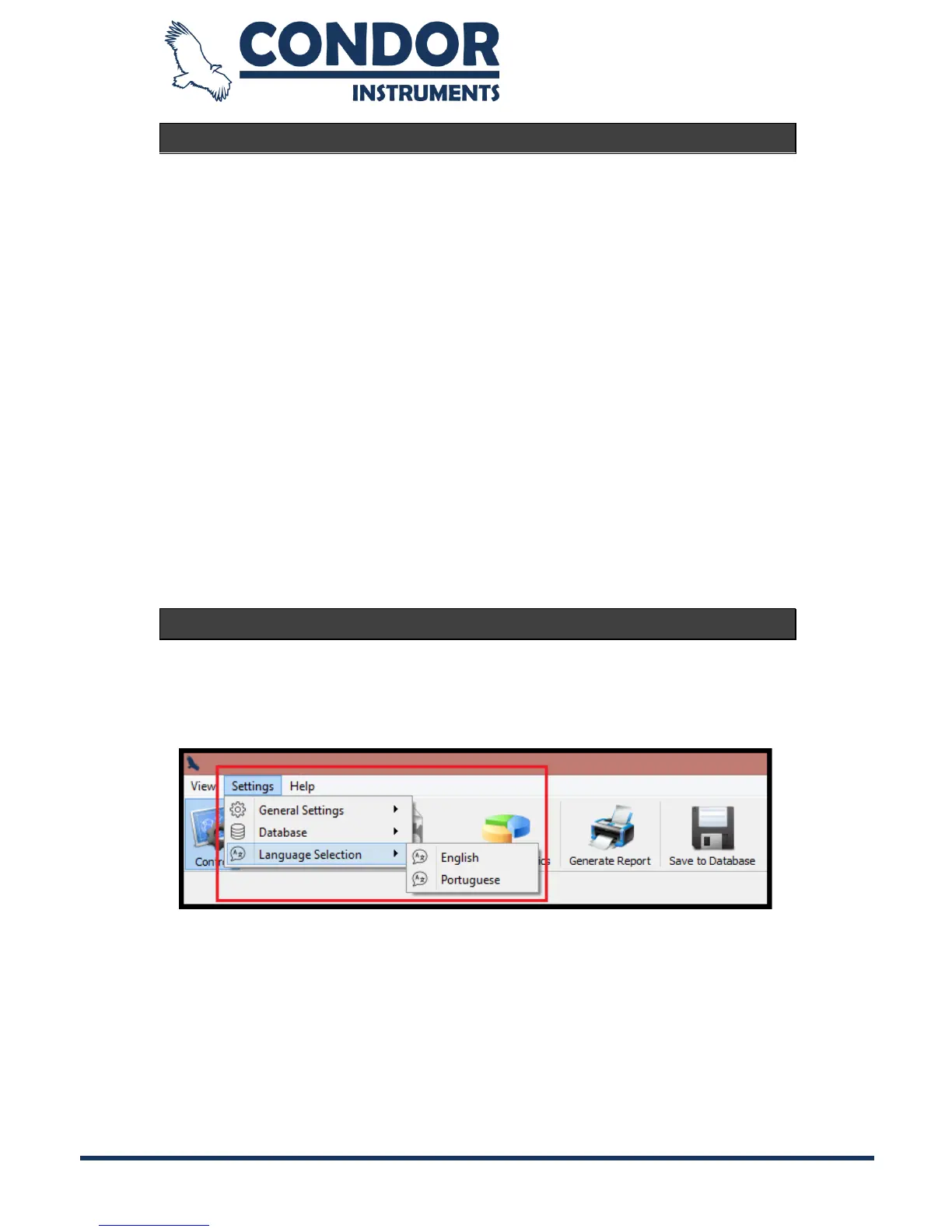
You can easily change the language using the “Language Settings” menu:
Note: the selected language will only be applied when you restart the ActStudio.



 To Next Page