EasyManua.ls Logo

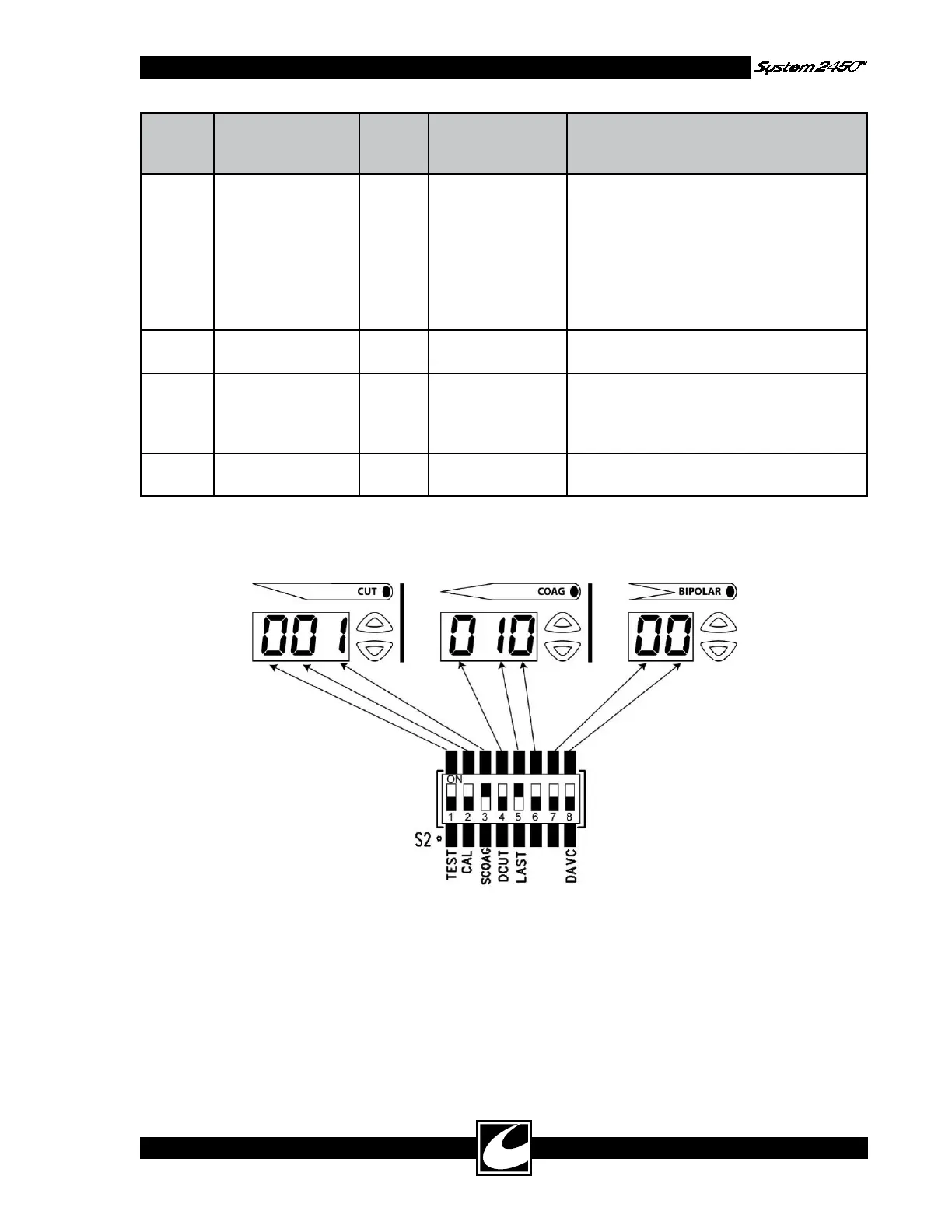
ConMed System 2450 - Figure 4.2 DIP Switch Positions

Default Icon
36 pages
Print Icon
To Next Page IconTo Next Page
To Previous Page IconTo Previous Page
Loading...
Figure 4.2 DIP Switch Positions
4-11
Config.
Switch
Position
Title / Display
Element
Default Description for
Off
Description for On
5 LAST / Coag 10’s On Defaults to Pure
Cut, Standard
Coag, and Micro
Bipolar and sets
all power levels to
zero (0W) each
time the system is
initialized.
Defaults all modes and power levels to the
last activated settings from the last time the
system was powered down.
6 Not used / Coag
1’s
Off Not used. Not used.
7 Blend Mode
Selection / Bipolar
10’s
Off Lo Blend is select-
ed when the Blend
Mode Select Key
is pressed.
Hi Blend is selected when the Blend Mode
Select Key is pressed.
8 DACview / Bipolar
1’s
NA DACview - See
below.
DACview - See below.

Other manuals for ConMed System 2450