3
SETTING UP YOUR PHONE
INSTALLING A microSDHC™ CARD
Power o your phone before installing or removing the
microSDHC card.
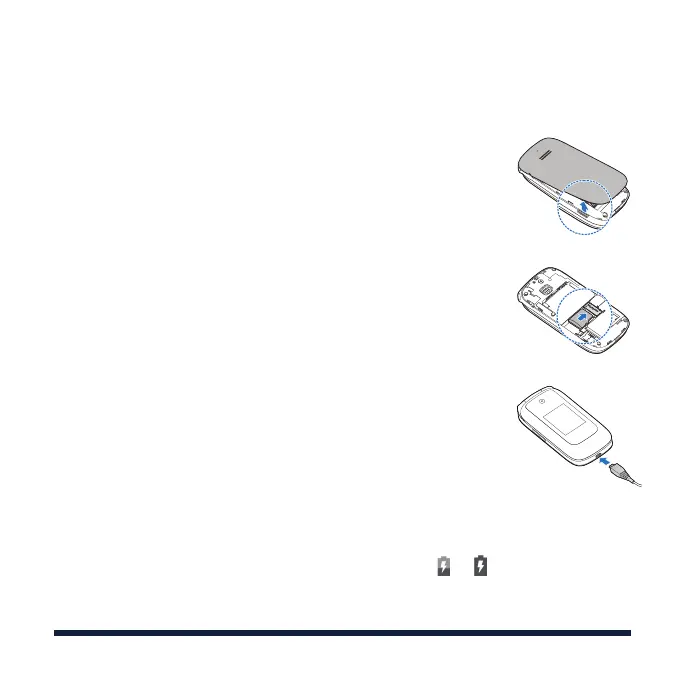
1. Place your finger in the slot at the lower left of the back
cover to lift and remove the cover.
2. If the battery is installed already, remove it.
3. Hold your microSDHC card with the metal contacts facing
down and slide it into the microSDHC card slot.
4. Install the battery.
5.
Press the cover gently back into place until you hear a click.
CHARGING THE BATTERY
You should fully charge the battery as soon as possible. If
the battery is low, there will be a pop-up message on the
screen. As you charge your phone, the external screen will
tell you the exact battery level from the status bar.
WARNING! Use only approved chargers and USB cables.
The use of unapproved accessories could damage your
phone or cause the battery to explode.
1. Connect the adapter to the charging port.
2. Connect the charger to a standard AC wall outlet. If the
phone is on, you’ll see a charging icon, such as or ,
appear in the status bar.
3. Disconnect the charger when the battery is fully charged.



 To Next Page