14 15
Contour
®
next GEN blood glucose monitoring system
TESTING
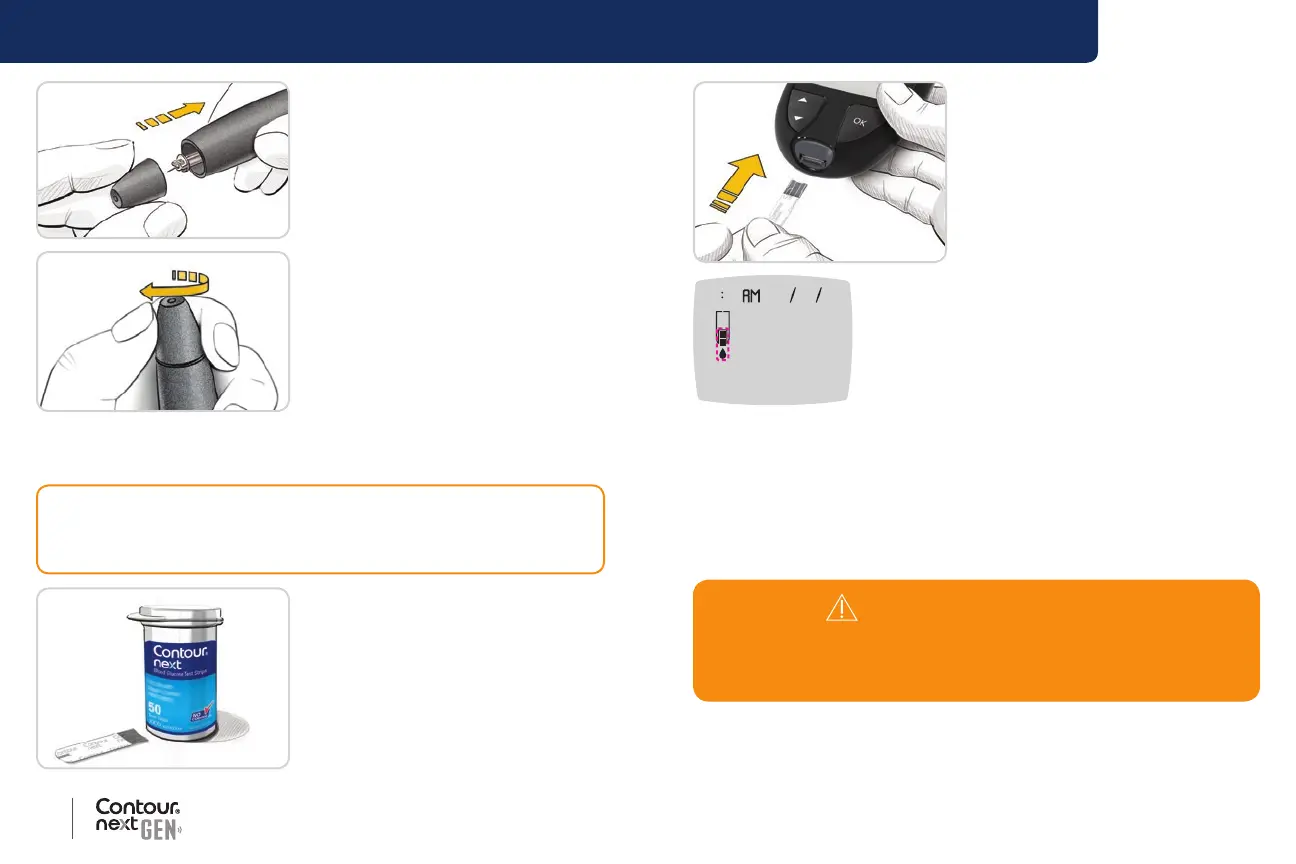
5. Replace the endcap.
6. Rotate the endcap dial to adjust
the puncture depth.
The amount of pressure applied
to the puncture site also aects
puncture depth.
Insert the Test Strip
1. Remove a Contour next test
strip from the bottle.
2. Tightly close the bottle lid
immediately after you have
removed the test strip.
CAUTION: Do not use expired materials. Using expired material can
cause inaccurate results. Always check the expiration dates on your
test materials.
3. Hold the test strip with the grey
square end facing toward the
meter.
4. Insert the grey square end rmly
into the test strip port until the
meter beeps.
10 45 42620
The screen displays the blinking blood drop
indicating it is ready to test a blood drop.
NOTE: After you insert the test strip, apply blood to the test strip within
3 minutes or the meter turns o. Remove the test strip and reinsert it to
begin a test.
Get the Blood Drop: Fingertip Testing
NOTE: For Alternative Site Testing instructions, see page 24.
WARNING: Potential Biohazard
Always wash your hands with antibacterial soap and water and dry
them well before and after testing or handling the meter, lancing
device, or test strips.



 To Next Page