46 47
Contour
®
next GEN blood glucose monitoring system
FEATURES
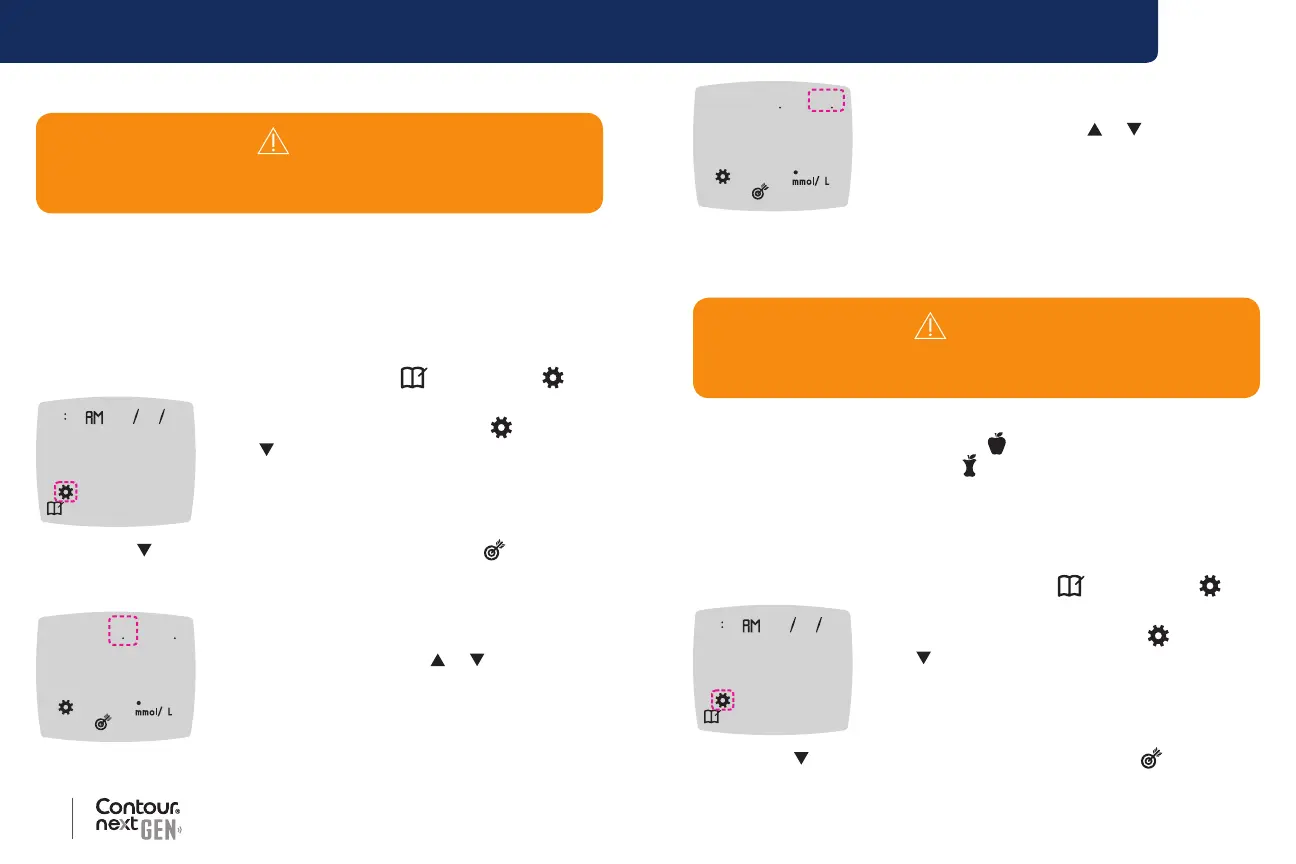
Change Overall Target Range
When the Meal Marker feature is O, your meter provides a pre-set
Overall Target Range. A Target Range has a low limit and a high limit,
such as 3.9 mmol/L–10.0 mmol/L. You may want your blood glucose
readings to stay within a target range. You can change the Overall
Target Range in Settings.
1. Press and hold the OK button until the meter turns on.
The Home screen has 2 options: Logbook
and Settings .
10 45 42620
2. To highlight the Settings symbol , press
the button.
3. When the Settings symbol is blinking, press
the OK button to enter Settings.
4. Press the
button repeatedly until the Target symbol is blinking,
then press the OK button. The meter displays the Overall Low
Target screen.
39 -1 00
39
5. To change the blinking Low end of the Overall
Target Range, press the or button.
6. To set the Low end, press the OK button.
WARNING
Discuss your Target Range settings with your health care
professional.
39 -1 00
100
7. To change the blinking High end of the Overall
Target Range, press the
or button.
8. To set the High end, press the OK button.
The meter returns to the Home screen.
Change Individual Target Ranges
When the Meal Marker feature is On, you have 2 Target Ranges on your
meter: a Before Meal Target Range
(which is the same as Fasting)
and an After Meal Target Range
. When the Meal Marker feature is
O, there is only 1 Overall Target Range.
You can change these ranges in Settings in your meter and in the
Contour Diabetes app.
1. Press and hold the OK button until the meter turns on.
The Home screen has 2 options: Logbook
and Settings .
10 45 42620
2. To highlight the Settings symbol , press
the button.
3. When the Settings symbol is blinking, press
the OK button to enter Settings.
4. Press the
button repeatedly until the Target symbol is blinking,
then press the OK button. The meter displays the Low Target screen.
WARNING
Discuss your Target Range settings with your health care
professional.



 To Next Page