15
Cassette
Installation
Bracket
STEP 2: Install the Shade
Click the shade onto the Cassette Brackets, placing the back of the channel onto the bracket. Push up on the
full Cassette and push in the Release Tabs until they snap into place (g. D).
Snap into place
Cassette Side
Prole
Cassette Side Prole
Bracket
Release Tab
Release Tab
Bracket
INSTALLATION: CASSETTE Shade — TOP Mount
•
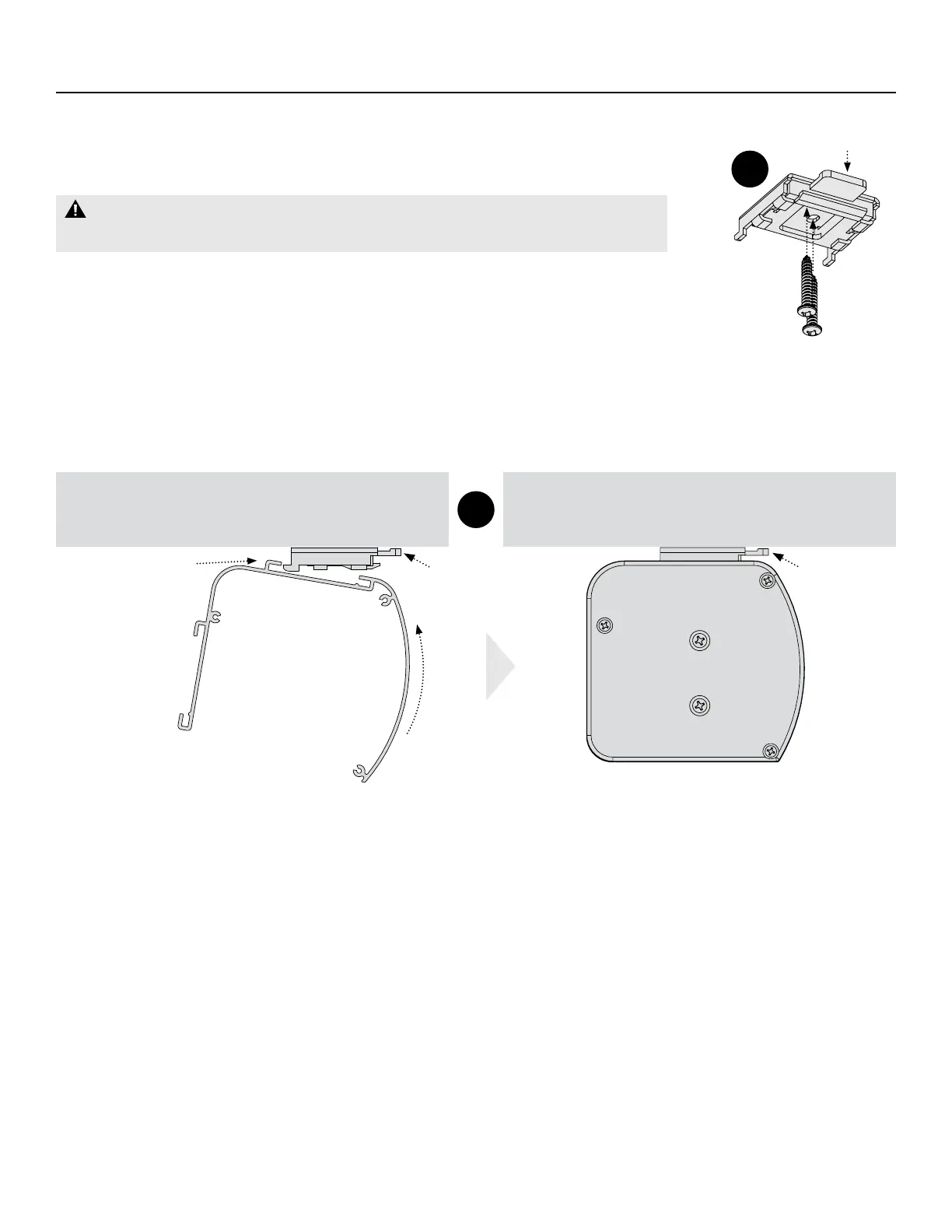
Center the Brackets over your three bracket marks, ensuring the spring-loaded
Release Tab is accessible for easy removal and mark the screw holes (g. C).
WARNING: Must be mounted into wood/metal studs or concrete anchors.
Mounting with drywall anchors is NOT recommended.
•
Drill pilot holes using a ⁄" drill bit.
•
Level the mounting surface and shim the brackets if necessary, then attach
brackets using the screws provided (g. C).
C
D
Release Tab


 To Next Page