Back
Mute
Buzzer
Edit address text
Configure battery
Back
Back
Level 3
Configure
Configure address
Mute
Buzzer
Mute
Buzzer
Global reset
Buzzer mode
Commission
Configure address
Configure
Edit panel text
Analogue level
Add delete address
Test
Thresholds
Scheduled tests
Level 3
Configure
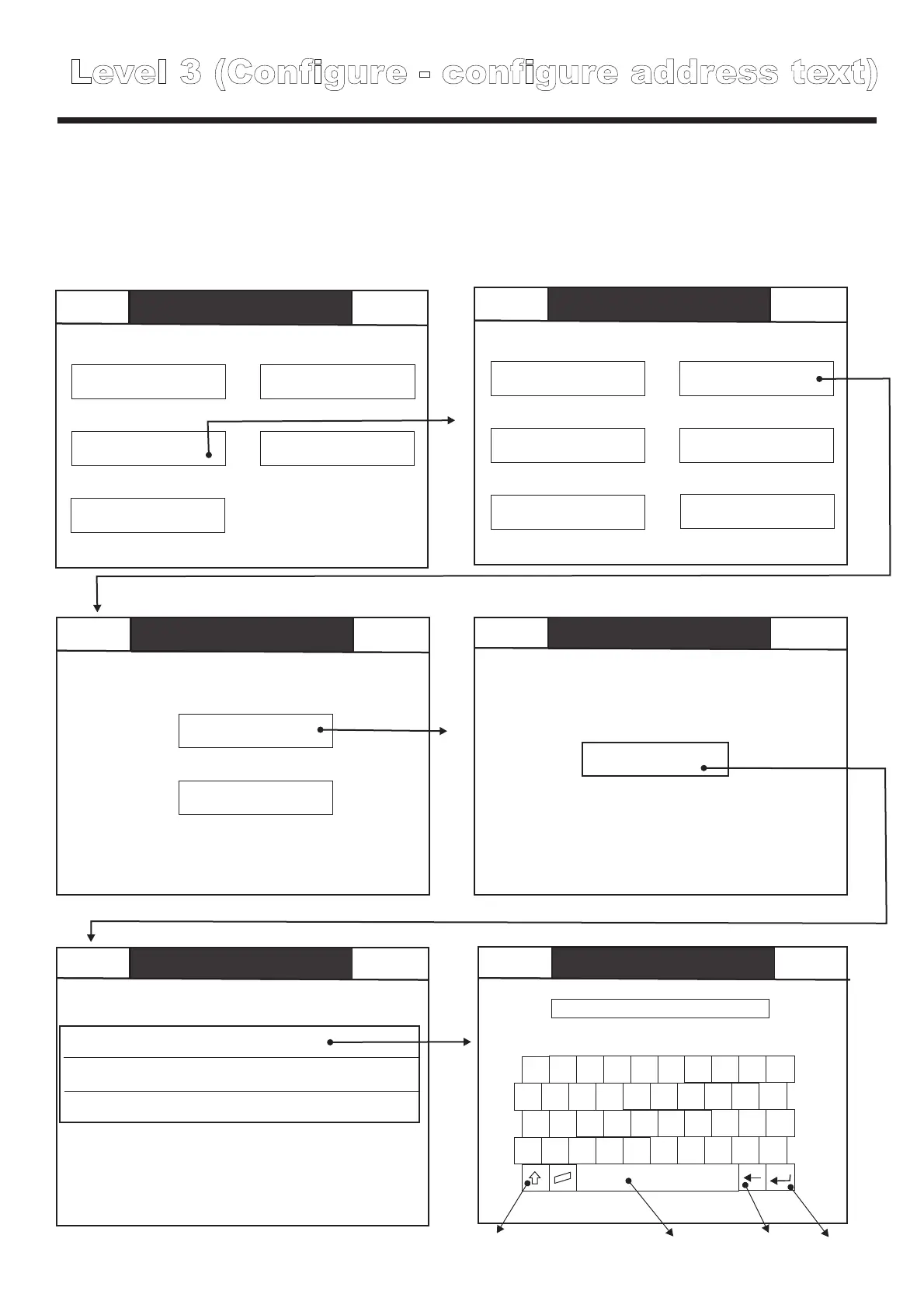
Level 3 (Configure - configure address text)
Back
Configure address
Edit address text
Mute
Loop 1
Back
Mute
Buzzer
Back
Mute
Buzzer
Group Allocation
Group 6
Edit address text
Loop 1 address 1 SCAEL
Loop 1; Address 1; Group 1; SCAEL; Nicad 2 cells
Reception Exit sign
Loop 1; Address 2; Group 1; SCAEL; Nicad 3 cells
Reception Above desk
Loop 1; Address 3; Group 1; SCAEL; Nicad 2 cells
Reception in corridor
***************
1 2
3
4
5
6
7
8 9 0
Q
W E R T Y I
O
P
U
A S D F G H
J
K L
;
Z X C V B N M
,
.
/
Enter
Back space
CAPS lock
Space bar
When Easicheck detects a fault, it will display details of the fault along with the address text of the
faulty device. Use “edit address text” to assign the required address text to each device.
NOTE: when commissioned by Cooper Lighting, a PC will be used to automatically
download the address text to each device.
Back
Mute
Buzzer
Edit address text
Configure battery
Back
Back
Level 3
Configure
Configure address
Mute
Buzzer
Mute
Buzzer
Global reset
Buzzer mode
Commission
Configure address
Configure
Edit panel text
Analogue level
Add delete address
Test
Thresholds
Scheduled tests
Level 3
Configure
Level 3 (Configure - configure address - battery type)
Back
Configure address
Edit address text
Mute
Loop 1
Back
Mute
Buzzer
Back
Mute
Buzzer
Group Allocation
Group 6
Edit address text
Loop 1 address 1 SCAEL Nicad
Loop 1; Address 1; Group 1; SCAEL; Nicad 2 cells
Reception Exit sign
Loop 1; Address 2; Group 1; SCAEL; Nicad 3 cells
Reception Above desk
Loop 1; Address 3; Group 1; SCAEL; Nicad 2 cells
Reception in corridor
For Easicheck to function correctly, Easicheck must be programmed wit the correct battery
configuration for each fitting, press the battery type button until the correct type is displayed, then
touch + / - to select the correct number of cells.
NOTE: when commissioned by Cooper Lighting, a PC will be used to automatically
download the appropriate battery data for each device.
OK
-
+
Battery type
Nicad 2 cells



 To Next Page