Home
Cord
Automobile Battery Charger
One
Page 20
Cord One - Page 20
48 pages
Manual
Save Page as PDF
To Next Page
To Next Page
To Previous Page
To Previous Page
Loading...
18
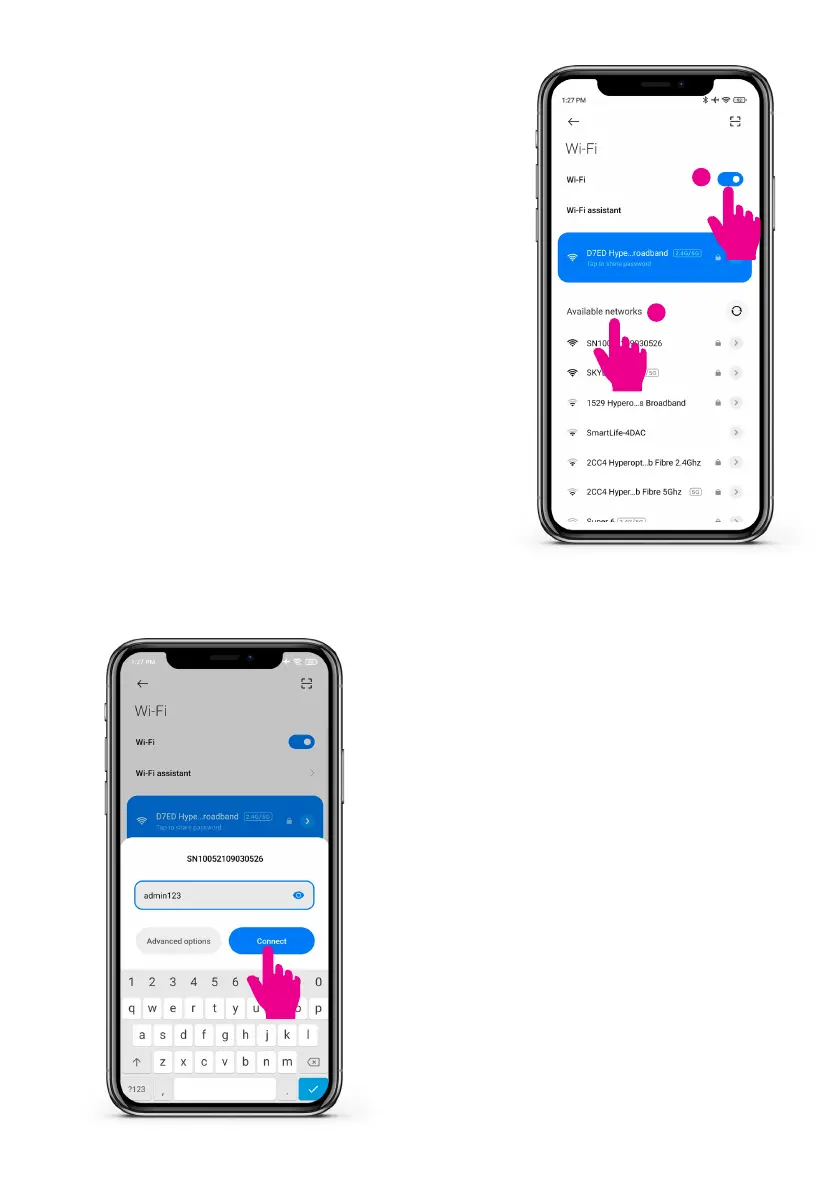
Step 5: Charge point Wi-Fi
•
T
urn on your smar
tphone Wi-Fi.
•
Afteroneminute,pleasendthecharge
point hotspot that begins with
”SN100...
”.
1
2
Step 6: Input charge point Wi-Fi password
•
Input “admin123” as the passw
ord.
•
Click connect.
19
21
Table of Contents
Main Page
Safety and Warnings
3
Table of Contents
4
Introduction
6
Product Introduction
7
External Structure
7
Charge Point Exploded View
8
Charge Point Visual Overview
9
Package Contents
10
Operation Instructions
11
Installation Preparations
11
Tools Required
11
Cables and Materials
11
Installation Process
11
Installation Notice
11
Pre-Installation Checks
12
Installation Details
13
Mounting
13
Electrical Wiring
14
Overview of Internal Structure
14
AC Wiring
14
Removing the Front Cover (Maintenance Only)
16
Power on Safety Checks
17
Installation Tests and Configurations
18
Load Balance Configurations
18
RCD Test Setup
24
Maximum Charging Current Setting (Optional)
27
Mode Configuration (Optional)
28
Network Configuration and Monta APP Setup
29
Charging Operations and Configuration
36
Charging Operation LED Indications
38
EV Smart Charge Point Regulation
41
Randomised Delay
42
Loss of Communications Network Access
42
Default Charge Schedule
43
Cyber Security
44
Troubleshooting
45
Maintenance
45
Warranty
46
Cord EV Knowledge Base
46
Security Events and Monta Support
46
Security Events
46
Monta Support
47
Cord Customer Support
47


 To Next Page