NL
DE
EN
93
CUSTOMER MANUAL M400 DRIVE SYSTEM
6.4 Usual Operation
6.4.1 ON/OFF switch
Turn on the power, press and hold (>2S) to power
on the display, the display begin to operate. Press
and hold (>2S) again to power off the display. If
the bike is not used, after 5 minutes (time can be set
in “Auto Off”) the display will be automatically turned
off. If the password function of the display is activated,
need to input the correct password to enter into the
normal display interface.
6.4.2 Power assistance level selection
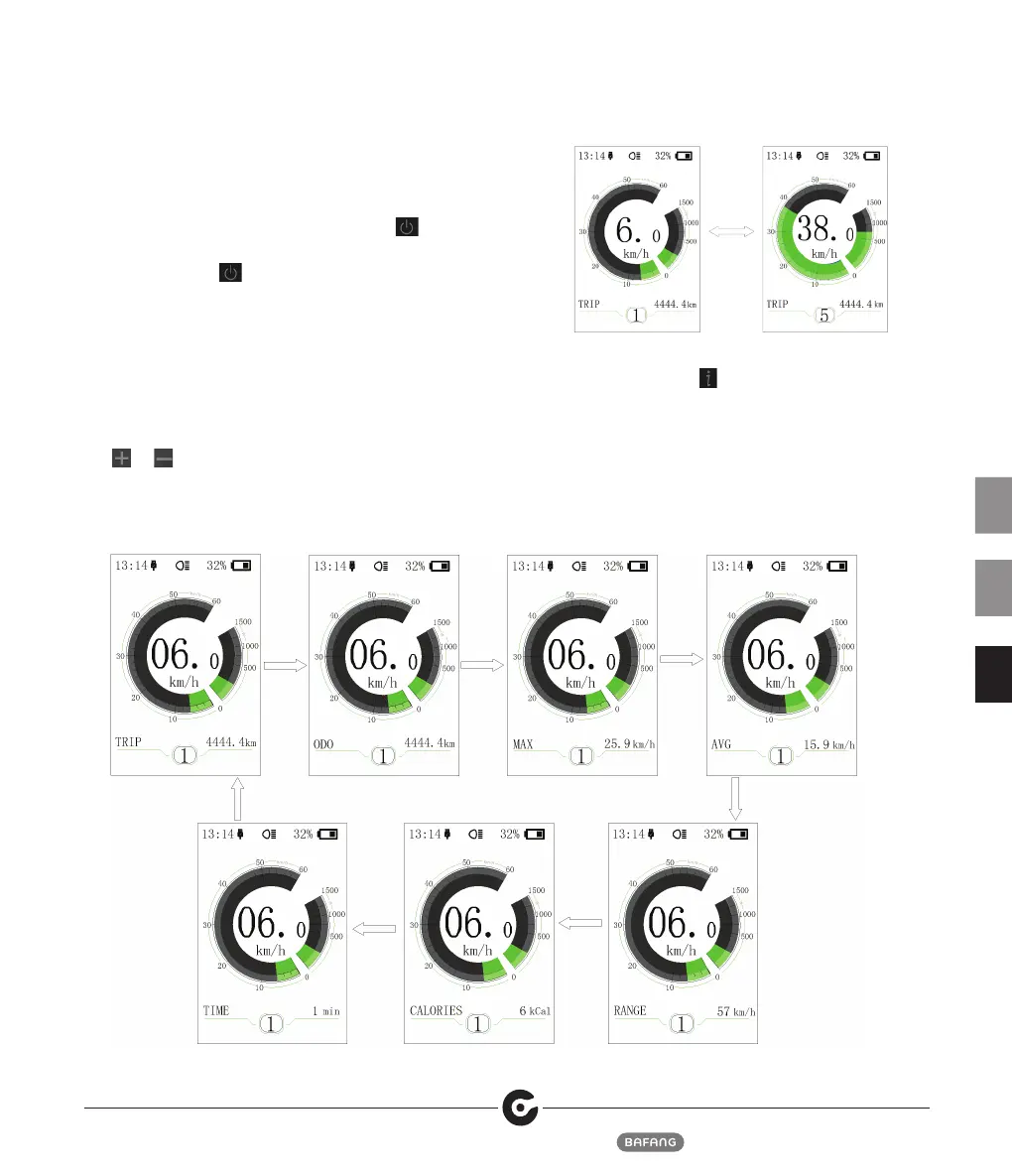
In the manual gearshift mode, briefly press (<0.5S)
or to switch the level to change the assistance
power, The lowest level is Level 0, the highest Level
5. When the display is on, the default mode is Level
1,“0”means no power assistance.
6.4.3 Multiple function interfaces switch
Briefly press (0.5s) to switch to different data
interface, circularly show signal-trip distance (TRIP)
→ total distance (ODO) → maximum speed (MAX) →
average speed (AVG) → remaining distance (RANGE) →
energy consumption (CALORIES) → time (TIME).Energy
consumption unit CALORIES means kCal.


 To Next Page