* Equipment available depending on version.
We reserve the right to modify the product and the design.
55
USER
MANUAL
4WD locking system oil (CHECK and change)
CHECK:
To check the 4WD locking system oil level, you have to drain the oil into a
calibrated container and measure the amount that has been extracted. The
correct volume is 0.05 L.
CHANGE:
It is convenient to frequently check that there are no leaks and the
maintenance of the oil level, for correct operation.
Changing the locking system oil.
1. Put the vehicle in the horizontal position and remove the front underbody
protector (see page 47).
2. Place a container under the 4WD locking system to collect the used oil
and avoid any spillage.
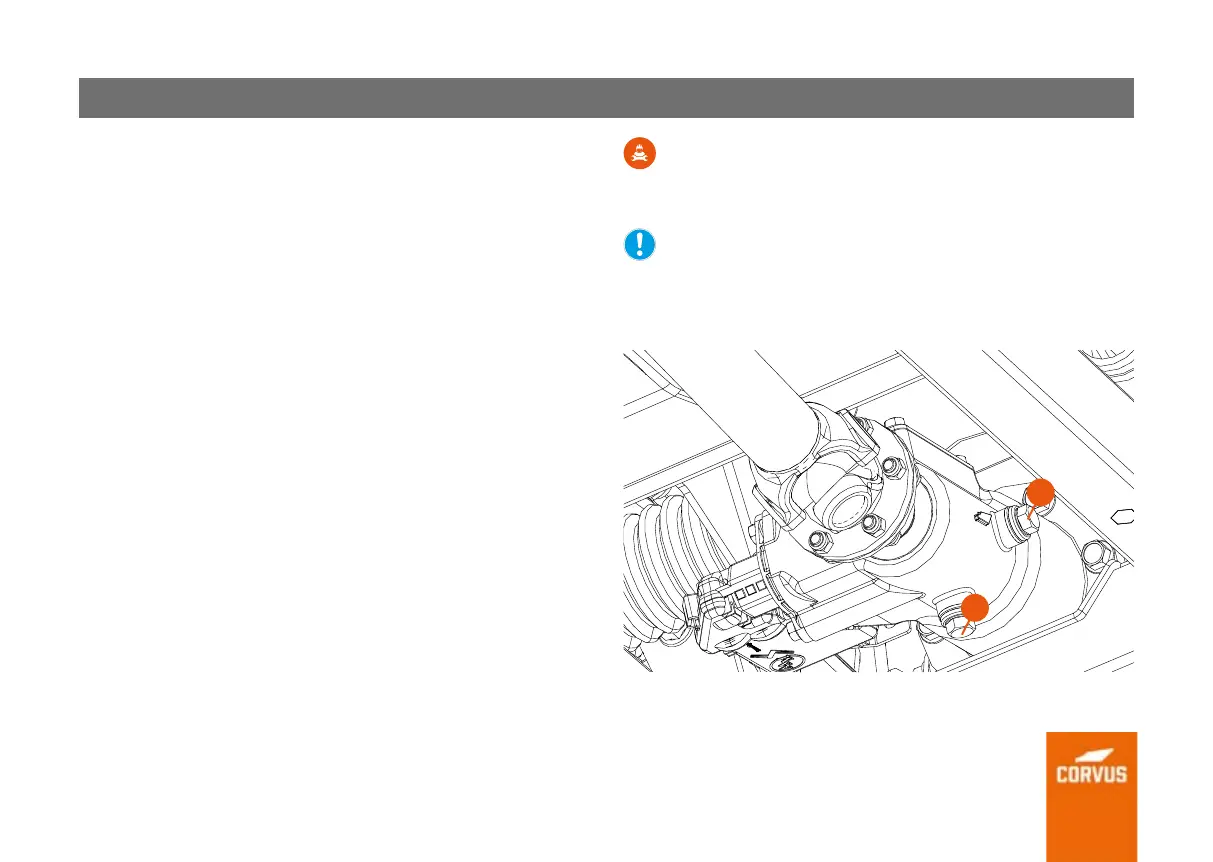
3. Remove the filler plug (1), to facilitate a better drainage of the 4WD oil.
4. Remove the drain screw (2) the 4WD locking system oil.
5. Once all the oil has drained out of the system, replace the washer and
make sure the drain screw is tightened at 24 Nm.
6. Fill with 0.05 L of new oil.
7. Replace the plug washer and tighten the oil filler plug (1) to 24 Nm.
TECHNICAL INFORMATION:
Recommended oil: SAE 80W-90, API GL5. Capacity: 0.05 L.
Tighten the filler plug/screw to 24 Nm.
Tighten the drain plug/screw to 24 Nm.
NEVER drive the vehicle with no or low oil in the 4WD actuator.
It is important that you are familiar with the maintenance intervals
for the components shown in the service chart.
1
2


 To Next Page