3.Assembly Procedure
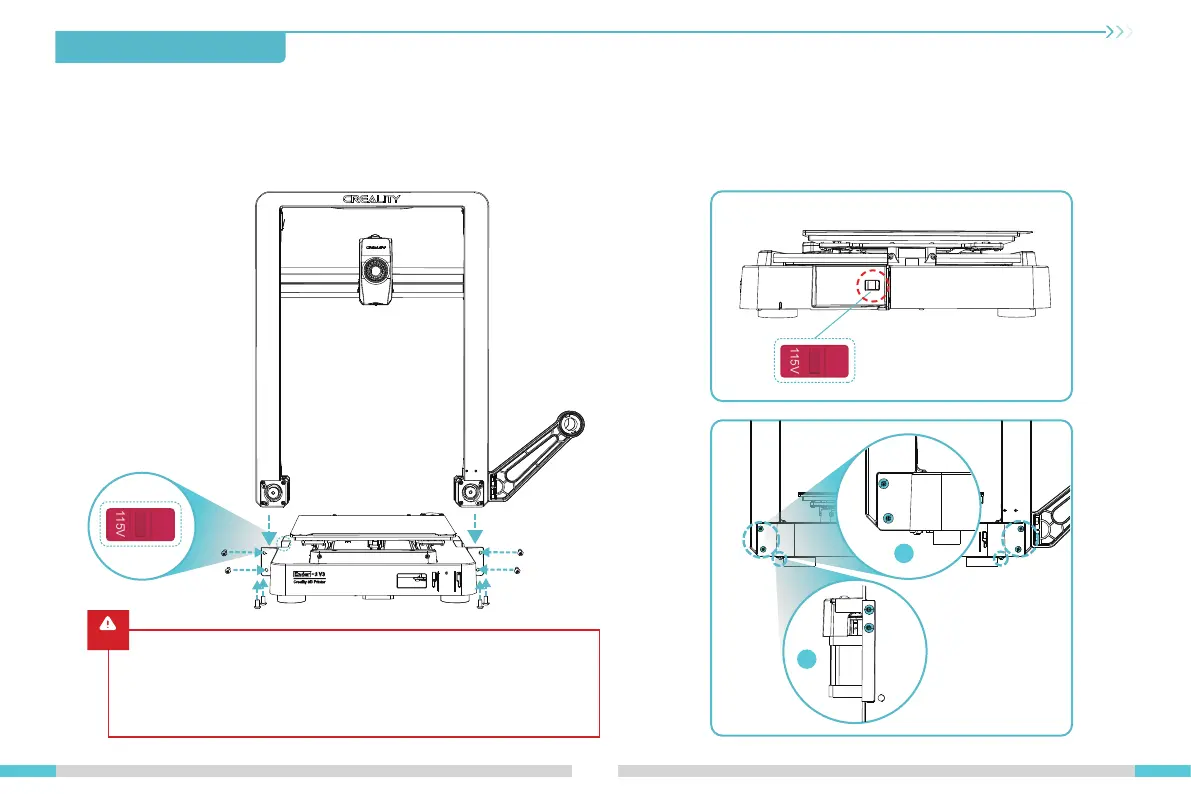
① Select the correct voltage mode based on the local power grid voltage;
② Place the gantry frame assembly into the slots on the base: A. First, use four M4×8 screws to align and secure the left and right screw holes on the base;
B. Then, use four M4×8 screws to align and secure the screw holes on the bottom of the base.
Caution
●
Please ensure the correct position for the power supply switch and mains
before supply connection, in order to avoid damage to the device.
●
If the mains between 200V and 240V, please select the 230V for the power
supply switch (default is 230V).
●
If the mains between 100V and 120V, please select the 115V for the power
supply switch.
04
3.2 Gantry Frame Assembly Installation
115V
230V
①
②
The voltage regulation gear
is located on the left side of
the base
M4×8 screws
A
B
Bottom
view
115V
230V














 To Next Page