38
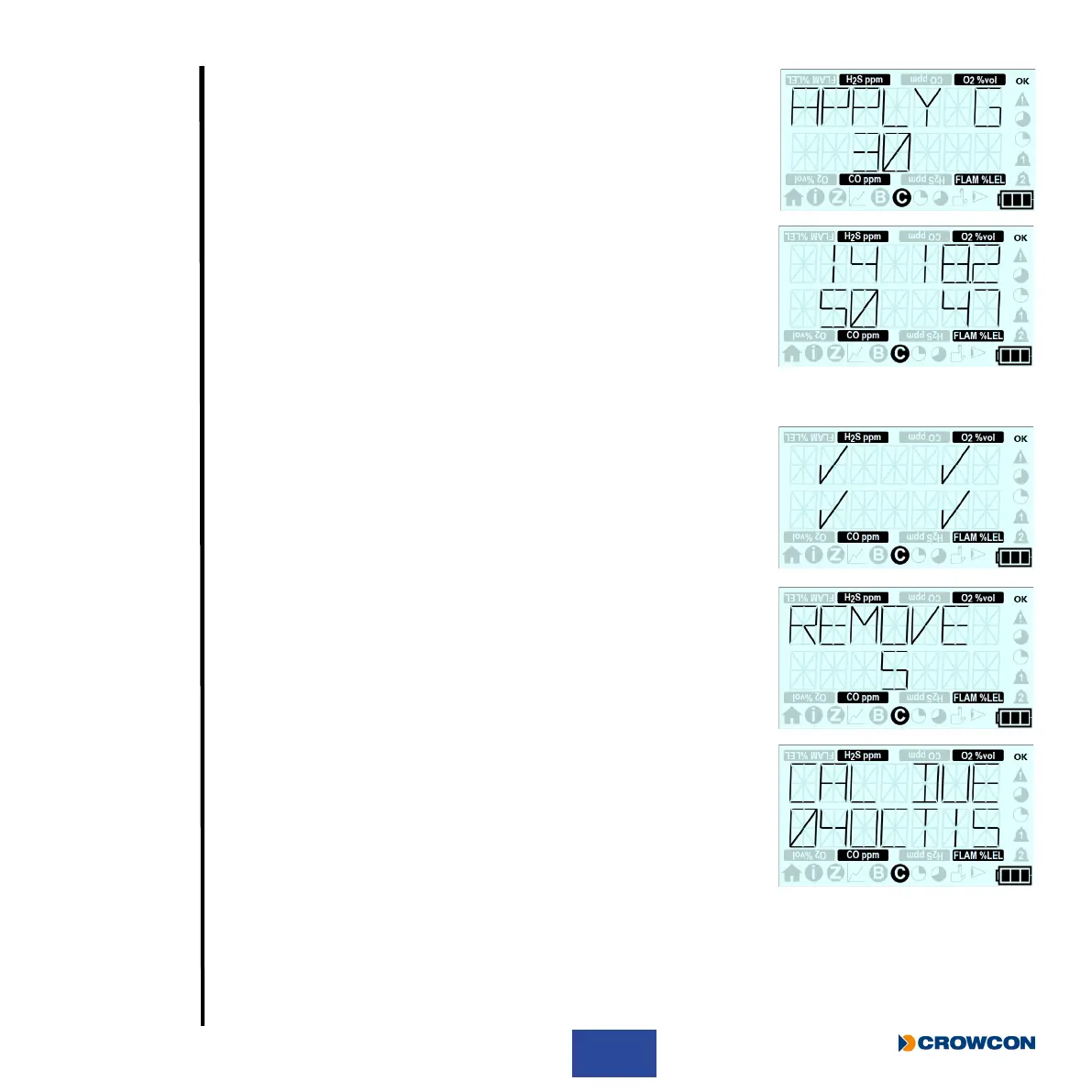
X If the zero is successful, the apply gas countdown screen will be
displayed.
X Fit the calibration/bump test plate and apply the calibration gas.
X When T4 detects the applied test gas the countdown screen
will be replaced with the calibration gas reading screen, this will
continue to show the gas readings until the calibration result is
displayed.
i
If the test gas is not supplied before the end of the
countdown the calibration will fail, the calibration will be set
to due and, if congured, the +ve Safety™ LED will be
illuminated red.
X If the calibration is successful a tick will be displayed for each gas
that passes, if the calibration is not successful a cross will
displayed for each gas that fails.
X The remove gas countdown screen will then be displayed, the test
gas must be turned off and the bump/calibration plate removed.
X If the calibration was successful the updated calibration due date
will be displayed.
X If the calibration failed, T4 will display the calibration due screen
and, if congured, the +ve Safety™ LED will be illuminated red.
X During the calibration as gas is applied the instantaneous alarms will
be activated as the gas level exceeds the congured alarm level.
X This will be indicated by the appropriate ‘bell’ alarm and gas type and unit icon ashing repeatedly
but the sounder, LED’s and vibrator will be disabled during the calibration.
X A short period after the completion of the calibration the sounder, LED’s and vibrator will be
enabled.
X Press the operator button to cancel the alarm.



 To Next Page