EasyManua.ls Logo

Cubicon Style Plus-A15 Series - Name of each Part

Cubicon Style Plus-A15 Series
71 pages
Print Icon
To Next Page IconTo Next Page
To Previous Page IconTo Previous Page
Loading...
CUBICON Style Plus-A15 Series User Manual
Name of Each Part
All printers get packed after a total inspection regarding the printing status. Therefore the
heating bed or the nozzle may have a trace of the use when it is initially installed or
operated, but there is no need to be concerned since it is a trace of the inspection.
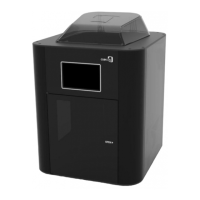
※ Names of Each Part on the Exterior of the Front Part of the Printer (Front)
[1] Top Cover
It is used for the
maintenance such as
replacement of the
filament
(loading/unloading)
[2] Front Door
It is used when taking
out a sculpture
[3] Display
5”(inch) display for
controlling the printer
[4] Filter Fan Vent
A passage that emits
internal air when the
filter fan is operated
[5] Interface Part
Interface and power
switch
[5A] Power Switch
A main power switch of
the printer
[5B] USB Port
(Type-A)
Printing can be done
by connecting a USB
memory stick.
[5C] Ethernet Socket
A terminal for
connecting a LAN
cable.
16

Table of Contents