4
CUES Inc.,MPlus+ User Manual | CH905
www.cuesinc.com, | salesinfo@cuesinc.com
OPERATING THE SYSTEM
PRECONFIGURED TEXT WRITING SCREENS/ARROW MODE/OBSERVATION
CODES
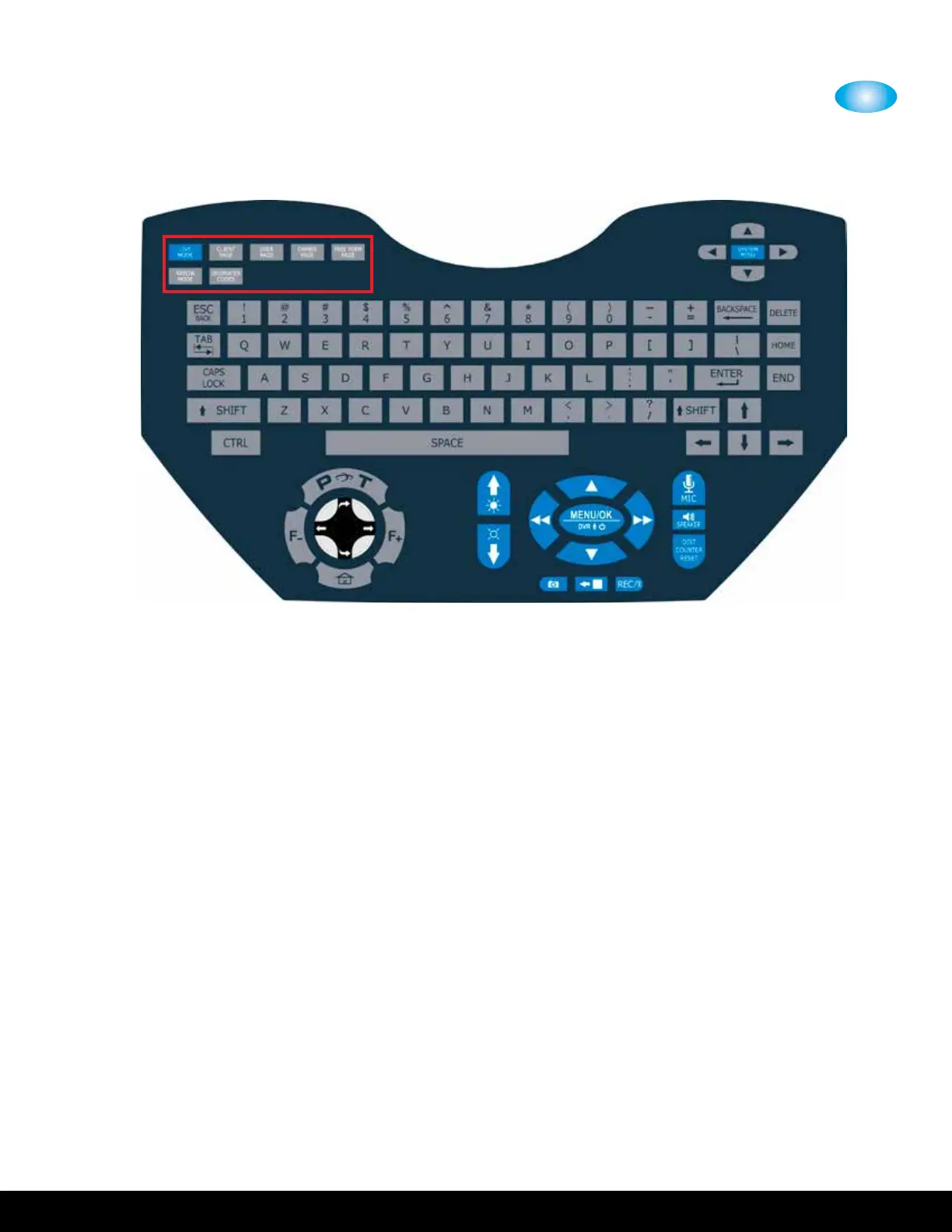
• LIVE MODE - video is displayed on the screen without any text
• CLIENT PAGE - Select to edit or view Client information
• USER PAGE - Select to edit or view User information
• OWNER PAGE - Select to edit or view Owner information
• FREE FORM PAGE - Select to edit or view Free Form information
On each of these four screens, pressing CTRLDELETE will clear all of the
operator entered data so that it may quickly set up with new information.
• ARROW MODE - an arrow is displayed on the screen. The arrow can be
positioned anywhere on the screen to help identify voids, defects, or
other observations in the pipeline.
Pressing any of these four buttons brings up the named screen in a read-only mode.
This means that there is no cursor ashing and characters may not be inserted/deleted.
Read-only mode is available so that these screens may be overlaid on the video screen
for recording purposes. A message will be displayed for two seconds indicating that
pressing the same button again will toggle into an editable mode, where text may be
inserted and deleted. On the editable screen a blinking cursor indicates where the next
character will be inserted.


 To Next Page