3
CUES Inc., MPlus+ User Manual | CH905
www.cuesinc.com, | salesinfo@cuesinc.com
SET-UP & INSTALLATION
INSTALLING THE MINI PAN & TILT
CAMERA - MPLUS XL SYSTEM ONLY
NOTE: If the electrical contacts on the camera (PAL P/N LL-, NTSC P/N LL-) or
spring assembly (CH) are dirty, clean them with alcohol, let dry, and apply a small amount
of DeoxIT (CS). If the O-ring on the camera is dry, apply a thin lm of O-ring lube (CS)
to the O-ring.
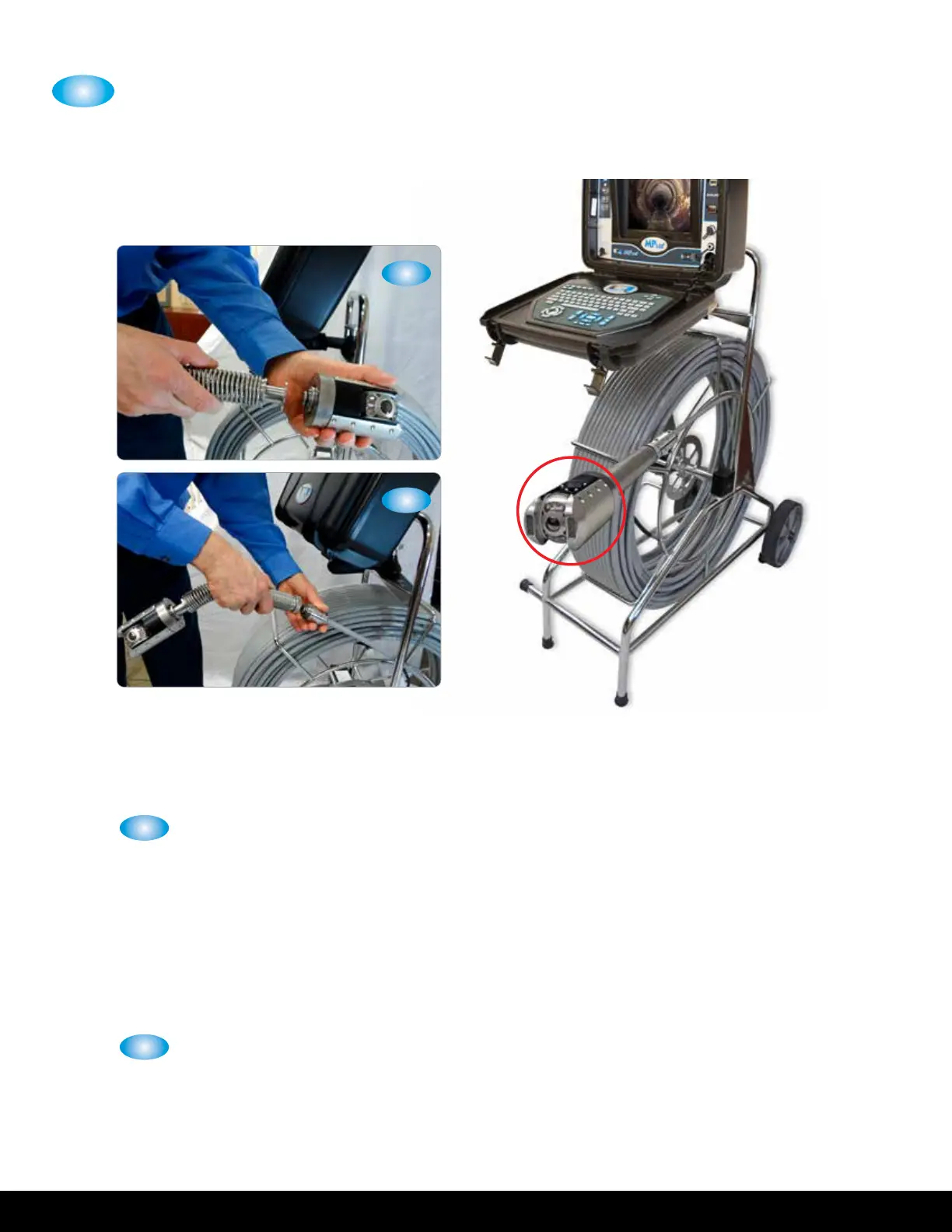
Align the pin on the camera to the mating hole on the spring assembly and
insert the camera into the spring assembly. Using a stubby /” Allen Wrench
(HW), route the () supplied screws () through the () holes located at
the end of the spring assembly and tighten until securely seated on the camera.
NOTE: If the electrical contacts on the push cable (CH-__PE) or spring assembly (CH)
are dirty, clean them with alcohol, let dry, and apply a small amount of DeoxIT (CS). If
the O-ring on the push cable connector is dry, apply a thin lm of O-ring lube (CS) to the
O-ring.
Align the pin on the push cable with the mating hole on the spring assembly and
insert the push cable into the spring assembly. Turn the knurled locknut on the
spring assembly until the spring assembly is securely seated on the push cable.
2
1
2
1


 To Next Page