Menu Lockout and Menu Default
Menu Lockout
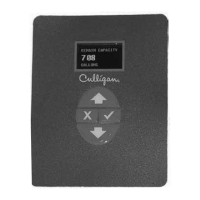
It is possible to lock the keypad of the GBE controller so that users will only have access to the INFORMATION,
MANUAL MODE, and SET DATE/TIME menu screens. The system can be locked by pushing the up and down
arrow keys simultaneously and holding them down for 10 seconds. Repeating this process will unlock the keypad.
Menu Default
Below is the procedure to default the board to factory settings and begin the FIRST TIME SETUP.
1. Power down the control.
2. Press and hold “UP” and “CANCEL” buttons.
3. Power up the control while continuing to hold “UP” and “CANCEL” buttons. for at least 5 seconds
4. Release “UP” and “CANCEL” buttons. (display should be blank - if not go back to step 1)
5. Power down the control.
6. Power up the control again. You should see the display light up for 2 seconds and then show FIRST
TIME SETUP.
7. Follow FIRST TIME SETUP process on page 23.
Menu Lockout and Menu Default 58
57 CULLIGAN GLOBAL ELECTRONIC CONTROLLER


 To Next Page