User Guide DDOC0199-000-A9
1-Slot Data Transport System (CSfC) 6 - 8 Encryption
© 2024 Curtiss-Wright Defense Solutions Revision 3.0
6.3.5.4 Load / Unload Stored Hardware Encryption Key to RMC Module
NOTE
The cmkey load / unload commands are typically not required. The RMC module stores a key
checksum in its memory. When the RMC module is inserted into the DTS1+ CSfC, all stored keys
are queried and the matching key is automatically loaded. If the key associated with the RMC
module is not stored in the crypto module, an error is reported.
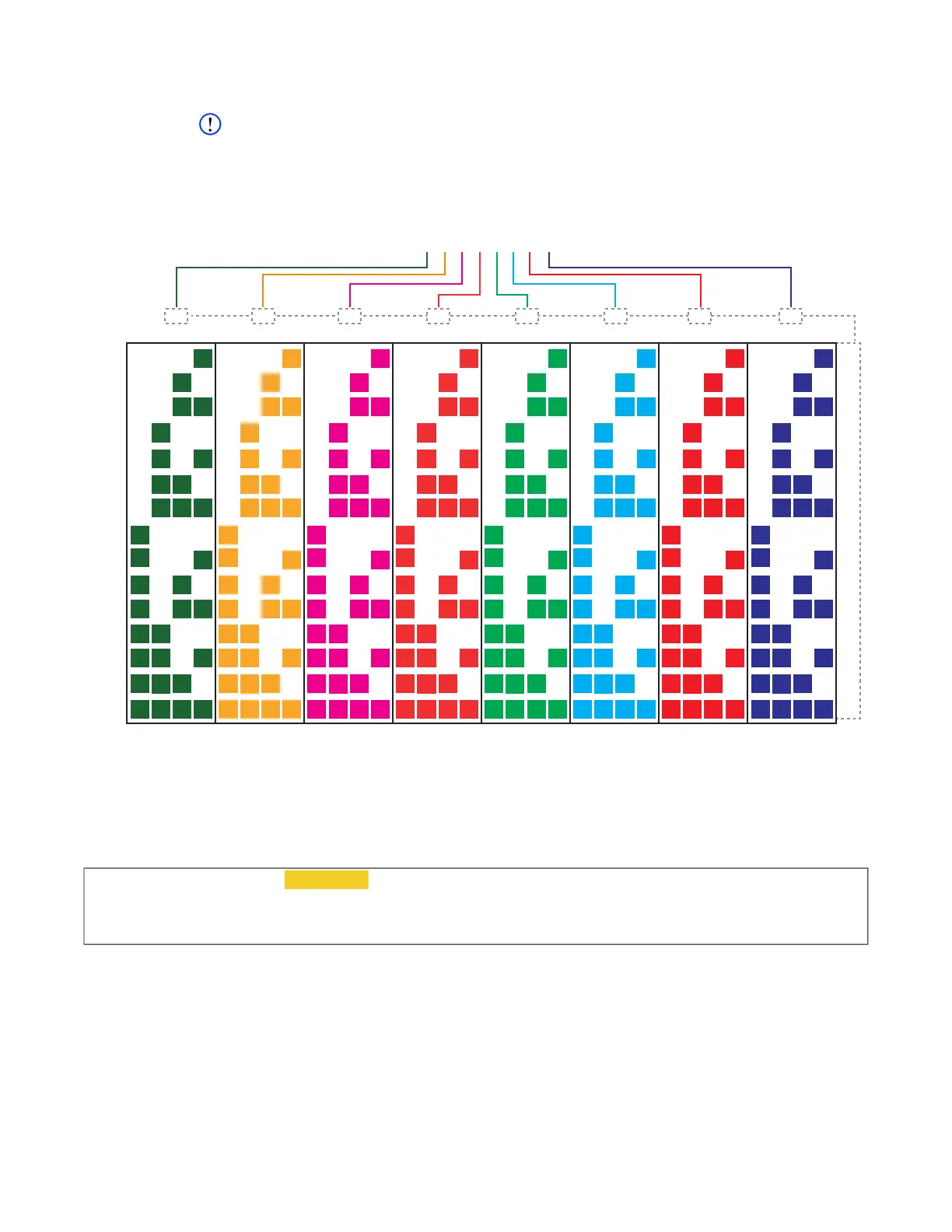
Figure 6.1 Key Storage Diagram
When a stored key is loaded into the crypto module, it must specify the installed RMC module
using the cmkey --load option. The --load option must be followed by the memory location
number that was used to save the desired key. The RMC module is specified with the -s 0 option.
To load a key to the RMC module type cmkey --load 0 thru 31 –s 0 and press E
NTER key.
Example
If an error message is returned, use the cmkey command (without options) to examine the
location.
Once the above command is executed, the selected RMC module will be associated with the
loaded DEK for its data encryption. To disassociate a key with the RMC module, the unload option
is used with the cmkey command, as shown below. This command requires that the RMC module
be identified by slot number (-s 0). To unload a key from the RMC module type cmkey --unload
0 thru 31 –s 0 and press E
NTER key.
00000000000000000000000000001111
00000000000000000000000000001110
00000000000000000000000000001101
00000000000000000000000000001100
00000000000000000000000000001010
00000000000000000000000000001010
00000000000000000000000000001001
00000000000000000000000000001000
00000000000000000000000000000111
00000000000000000000000000000110
00000000000000000000000000000101
00000000000000000000000000000100
00000000000000000000000000000011
00000000000000000000000000000010
00000000000000000000000000000001
31 30 29 28 27 26 25 24 23 22 21 20 19 18 17 16 15 14 13 12 11 10 9 8 7 6 5 4 3 2 1 0
F
E
D
C
B
A
9
8
7
6
5
4
3
2
1
0xnnnnnnnn
1-F 1-F 1-F 1-F 1-F 1-F 1-F 1-F
CM Key
Location
DDOC0199-0035
cw_dts> cmkey --load 0 thru 31 –s 0
[cmkey]
CMKEY: action=load slot=0 status=OK
[!cmkey] OK



 To Next Page