D1091 Rev.M August. 2016
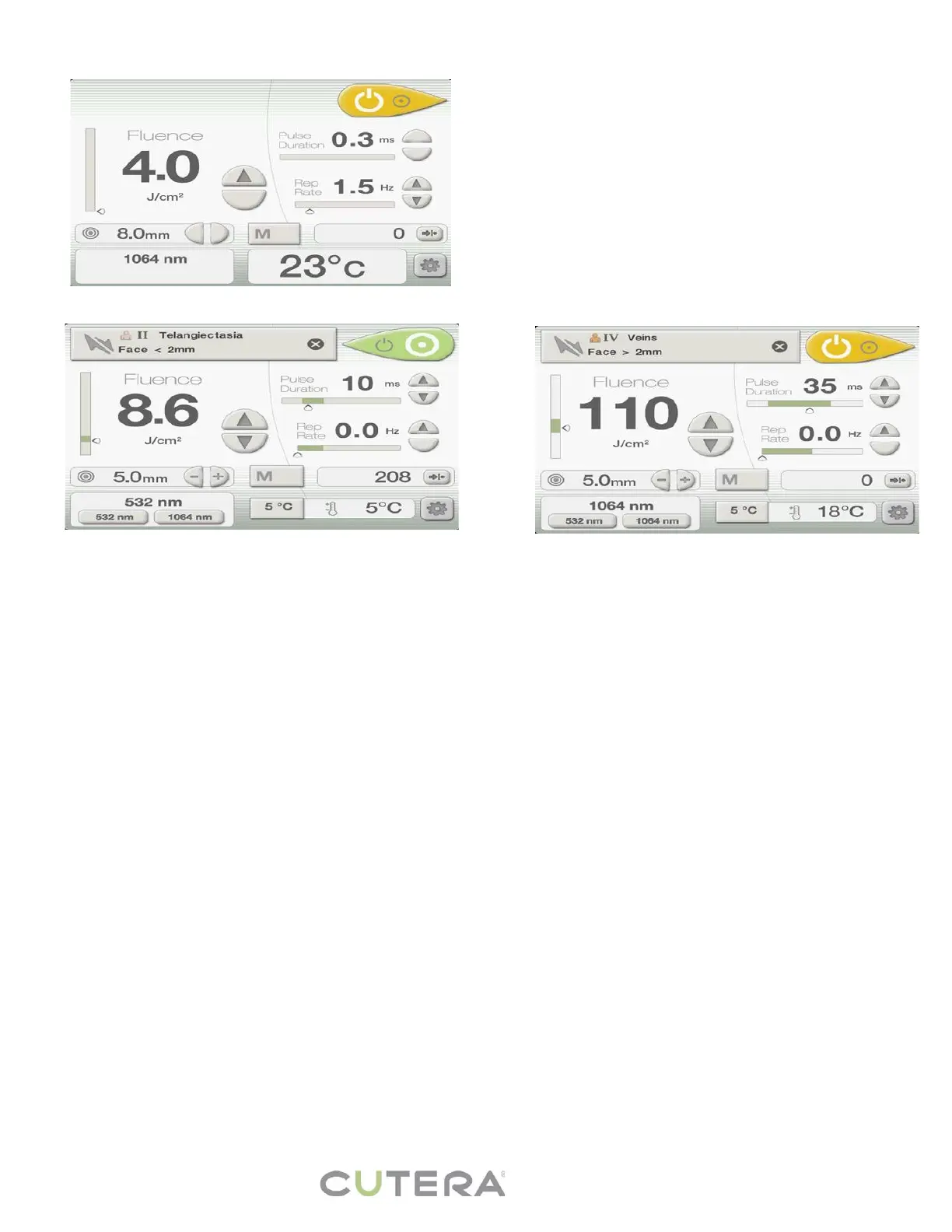
EXCEL V USER INTERFACE
1. Fluence is the energy measured in J/cm
2
. Press the Up/Down arrows to adjust.
2. Pulse Duration is the length of each pulse measured in milliseconds (ms). Press the UP/Down arrows to adjust.
The pulse duration is set to 0.3 ms and cannot be adjusted when using the genesis V handpiece,
3. Repetition Rate is the number of pulses per second measured in Hz with foot pedal depressed. Press the
Up/Down arrows to adjust.
4. Temperature can be adjusted to 5°C, 10°C, 15°C, or 20°C by selecting the Temperature Icon. The real time
temperature is also displayed. The temperature cannot be adjusted when using the genesis V handpiece.
5. Memory Button saves 3 different settings per wavelength for common indications.
6. Number of Pulses is displayed. Press the reset button to reset.
7. Spot Size is adjustable from 2 - 12 mm. Press –/+ to adjust. The Spot Size cannot be adjusted when using the
genesis V handpiece.
8. Standby/Ready Button – Press to toggle between Standby and Ready Mode. Standby/Ready button is yellow
and the handpiece cannot be fired when in Standby Mode. Standby/Ready button is green when in Ready Mode.
The system will not go into ready mode unless the handpiece is out of the holster. Press the foot pedal to start
the pulse after the “flute” sound indicates system is ready.
9. Wavelength – Chosen wavelength will be displayed. Select either 532 nm or 1064 nm to select wavelength for
treatment. The wavelength cannot be adjusted when using the genesis V handpiece.
10. Information Screen – The Information & Adjustment Screen can be accessed to verify system software version
or adjust the screen brightness, volume level or beam intensity.
NOTE: Treatment parameters are interrelated. Therefore, not all parameter combinations are simultaneously
available. If you attempt to select a treatment setting that is not available, the system emits a distinct audible tone.
Changing one or more of the other parameters may enable you to select the desired treatment setting.
CoolView 1064 nm User Interface
10
CoolView 532 nm User Interface



 To Next Page