3.6.3 Writing Configuration To Network
To write the system configuration from the USB to the network you must:
1. Insert a USB drive in to the COI. The following files must present in the root folder:
a) CZone.bak - This config file backup must match the existing system config before a config update can
occur. This file is generated by copying the existing configuration to the USB as above.
b) *.zcf - A single configuration file to be written to the network. If more than one file is present no update will
occur.
c) No firmware update files (*.czfwp).
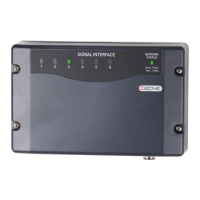
2. Press the USB button for 5sec or until the LED flashes RED.
3. Wait for the USB LED to turn solid green before removing it. This should take less than 20sec.
4. Once the system configuration has been updated the following files will be created/updated:
a) *.csv - A basic spreadsheet listing information about the system and modules connected to the network.
b) CZone USB Result.txt - A text file describing the result of the last operation performed, as well as these
instructions.
3.6.4 Updating Device Firmware
To update firmware of devices on the network you must:
1. Insert a USB drive with the following files in the root folder: The following files must be present in the root
folder:
a) *.czfwp - A single CZone firmware update file to be used to update devices in the system.
b) No configuration files (*.zcf).
2. Press the USB button for 5sec or until the LED flashes RED.
3. Wait for the USB LED to turn solid green before removing it, this operation can take 10-40minutes depending
on the number of different module types in the system. The COI channel LEDs will sweep back and forth
when looking for devices of a particular type to update. Once devices of a particular type are found and are
being updated, the LEDs will indicate progress for this update.
4. Once the firmware has been updated the following files will be created/updated:
a) *.csv - A basic spreadsheet listing information about the system and modules connected to the network.
b) CZone USB Result.txt - A text file describing the result of the last operation performed, as well as these
instructions.


 To Next Page