18D-Link DIR-818LW User Manual
Section 3 - Conguration
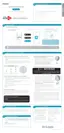
Select your time zone from the drop-down menu and click Next to
continue.
The Conrm Wi-Fi Settings window will display your wireless settings.
Write the information down, so you can congure your Wi-Fi devices
correctly. Click Next to continue.
The Saving Settings window will appear. Wait while the router is checking
Internet connectivity.
You will have the option of creating a bookmark. If you want a bookmark
to the Router Web Management, click OK. If not, click Cancel.
Note: If you click OK, a window may appear, depending on the browser you
are using. Follow the instructions to create a bookmark.



 To Next Page