76D-Link DIR-818LW User Manual
Section 3 - Conguration
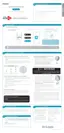
The priority of the message ow is entered here --1 receives the highest priority (most urgent) and 255 receives the lowest priority
(least urgent).
The Protocol used by the messages (TCP, UDP, or ALL).
The rule applies to a ow of messages whose LAN-side IP address falls within the range set here.
The rule applies to a ow of messages whose WAN-side IP address falls within the range set here.
Select a service or port you want to assign to this rule.
Click on Save Settings.
Queue ID:
Protocol:
Local IP Range:
Remote IP Range:
Application Port:



 To Next Page