209D-Link ShareCenter DNS-325 User Manual
Section 4 - Conguration
Remote Backups
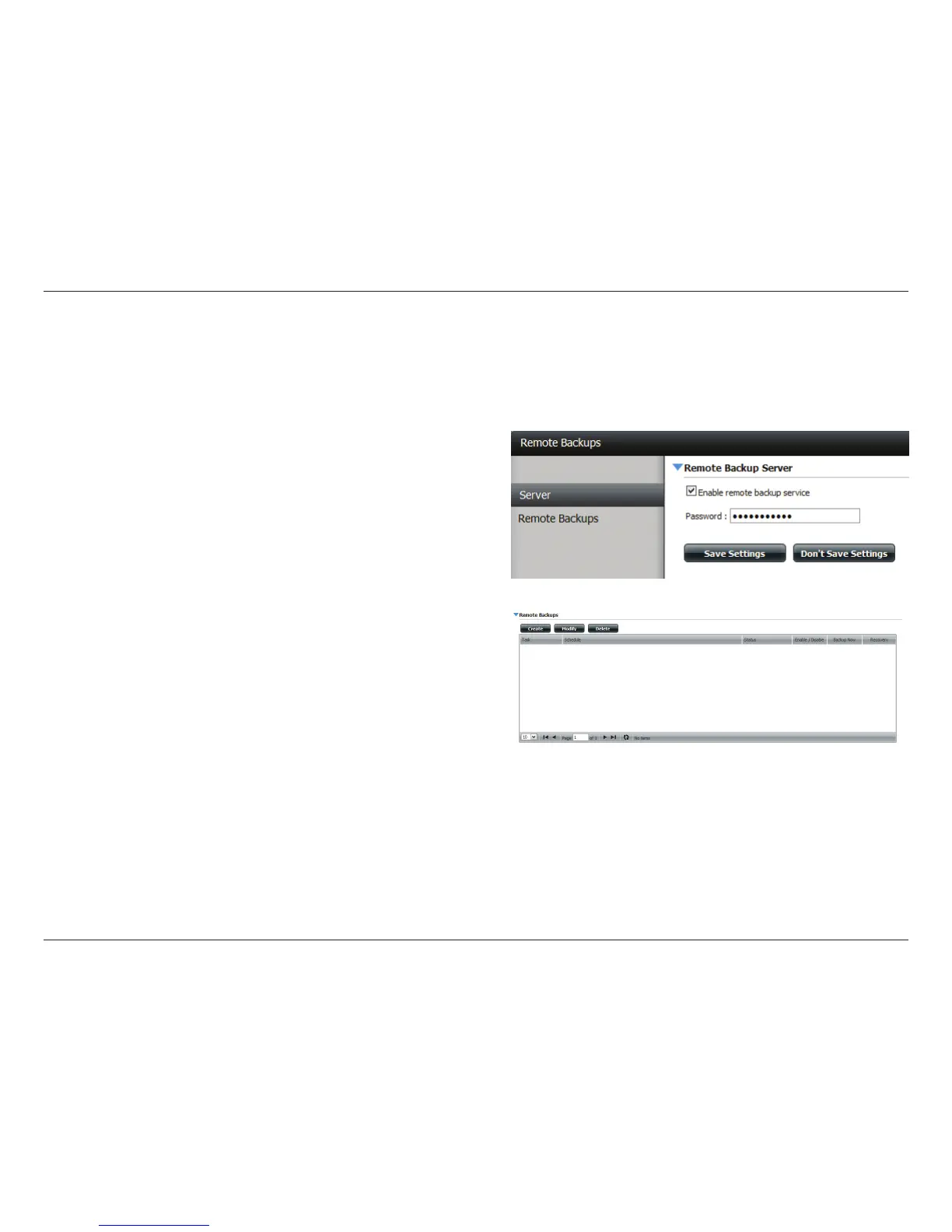
Remote Backups allows you to back up your device to another ShareCenter™ or Linux Server or vice versa from a remote ShareCenter™ or Linux
Server to your device. Click the Create button in the remote backups list to start a wizard where you can congure the Remote Backup functionality.
Enable remote backup
service:
Check this box to enable the remote backup
server functionality to that a remote NAS or
Linux.
Note: If you are not using the Remote Backup
functionality leave this box unchecked so
that your device performance will not be
aected by the additional overhead used by
this process.
Password: Enter a password that the remote client will
use.
Remote Backups list: This is the list of remote backup jobs built by
pressing the Create button above the list to
congure each job.
Create: Click the Create button to build a new
remote backup job.
Modify: Click to make changes to your existing
Remote Backup jobs in the Remote Backup
list. You must select the remote backup job
rst and then click the Modify button.
Delete: To remove a Remote Backup job select the job
in the list and then click the Delete button.
Note: When you use the NAS as the source backup provider of all
your content, make sure you enable the Remote Backup Server with
a password. You will also need to congure the router to forward data
through port 22 or port 873 to the IP address of the ShareCenter™.



 To Next Page
 Loading...