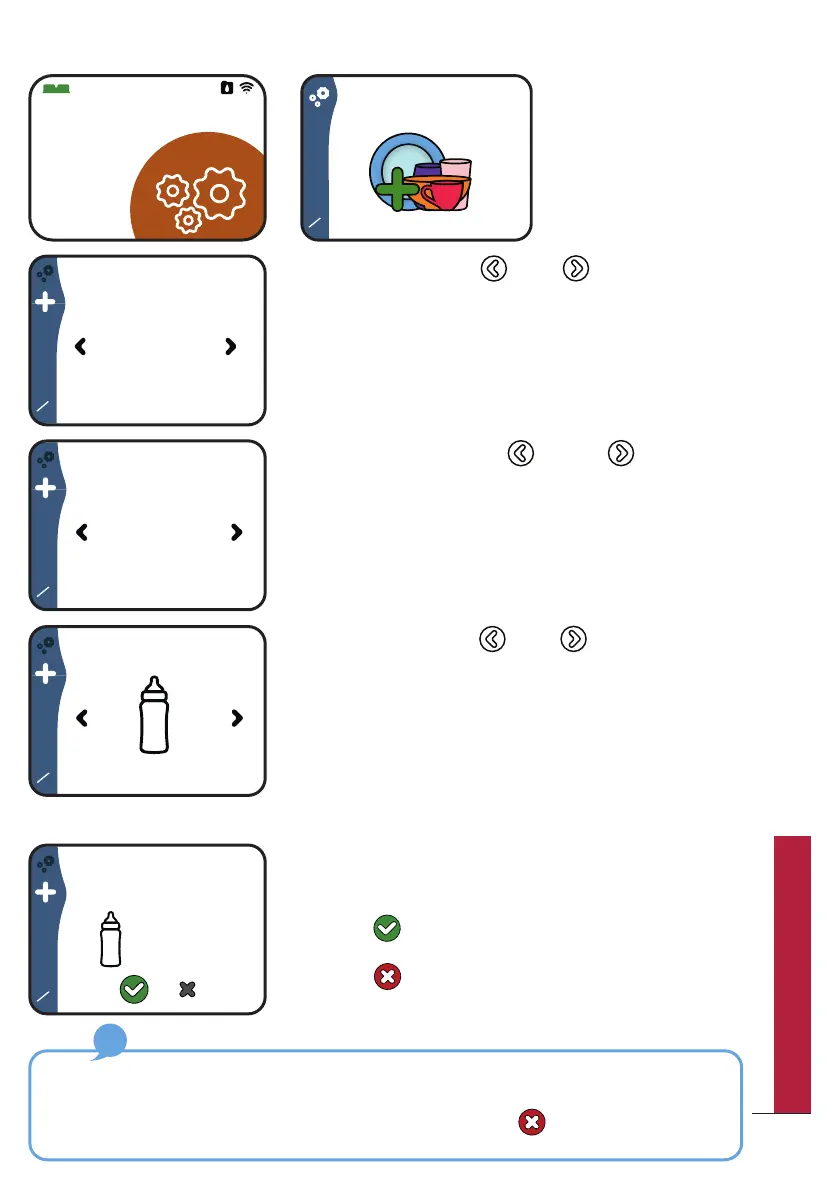
y Go to “Settings” and
choose “Create new
cycle”
y Use the buttons and to choose a duration
from 10 to 120 minutes.
y Confirm your choice by pressing the central button.
y Use the buttons and to choose the
temperature from 30°C to 70°C
y Confirm your choice by pressing the central button.
y Use the buttons and to choose an icon for
your program.
y Take your time, you have 12 icons to choose from!
y Confirm your choice by pressing the central button.
y Once those 3 parameters are defined, you will
be asked to confirm your custom program.
y Select to save your custom program.
y Select to cancel the custom program and
be redirected to the “Create a cycle” screen.
In case of an incorrect entry: unfortunately, it is not possible to go back if you
have selected a parameter you did not want to. Thus, you must continue with the
remaining steps and cancel it on the final release screen . You can then start to
create custom program again.
3
3
Confirm cycle?
40 MIN
70°C
Cycle 1
How to create a custom program?
45
QUICK UTILIZATION GUIDE



 To Next Page