5 | Manage your bob froM your
d
aan tech account
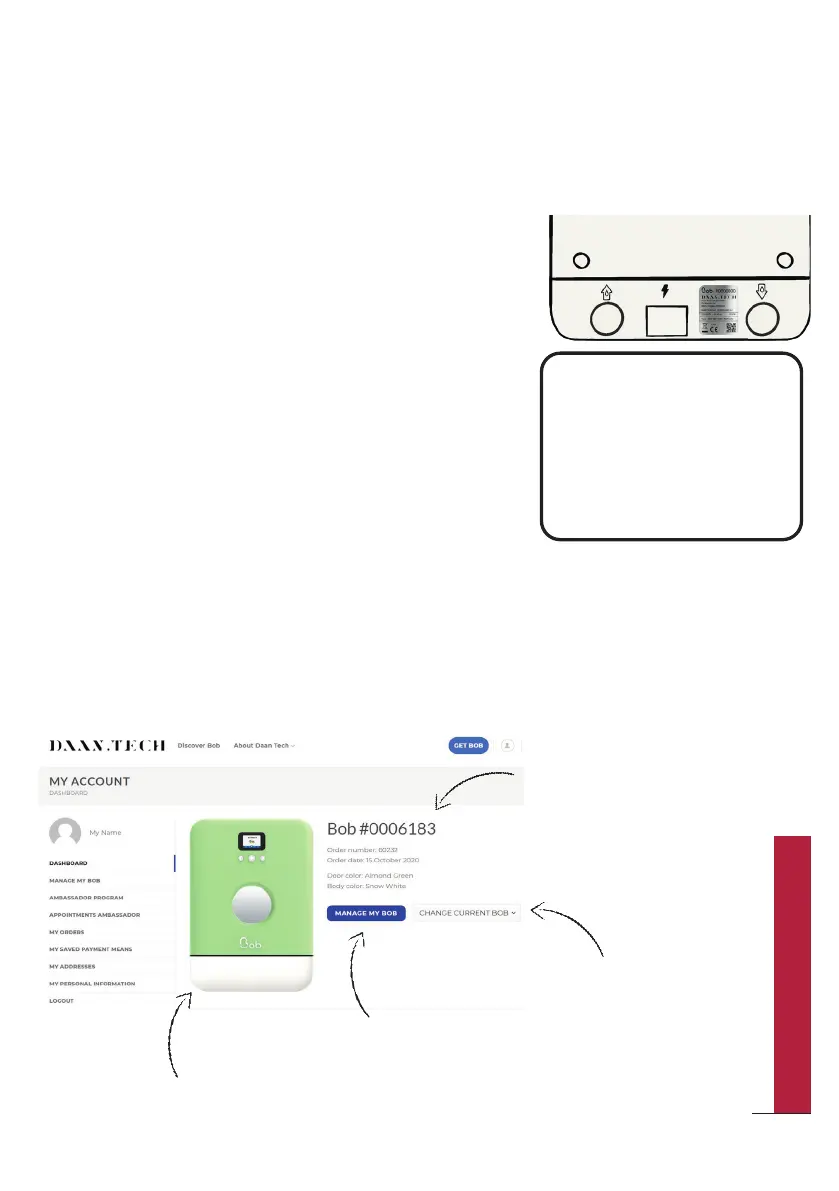
Every Bob has two unique ID numbers:
y A unique birth number created during the
manufacturing process! You can find this
number on the label on the backside of Bob,
in the form of “Bob #0000000”
y A unique software ID that allows you to link
Bob to your Daan Tech account. You can find
the software ID (or MAC address) of your Bob
when you connect Bob to Wi-Fi or in “Settings”
> “Informations”. Format 00:00:00:00:00:00
Every Bob ordered on www.daan.tech is linked to a customer account.
Once you ordered Bob, you can see its profile directly on the dashboard in your
“My Account” area.
Unique number of your Bob
Miniature of your Bob with its colour
“Select another Bob”
button
“Manage my Bob” button
Bob’s unique ID numbers
How to manage Bob from your account?
Bob ID:
Login to your account on
www.daan.tech and enter
this ID in the "Manage my
Bob" tab
00:00:00:00:00:00
51
QUICK UTILIZATION GUIDE



 To Next Page