Quick-start guide
Please follow the guide from the beginning to the end. Before you connect the video equipment
make sure all equipment is switched off at the plug.
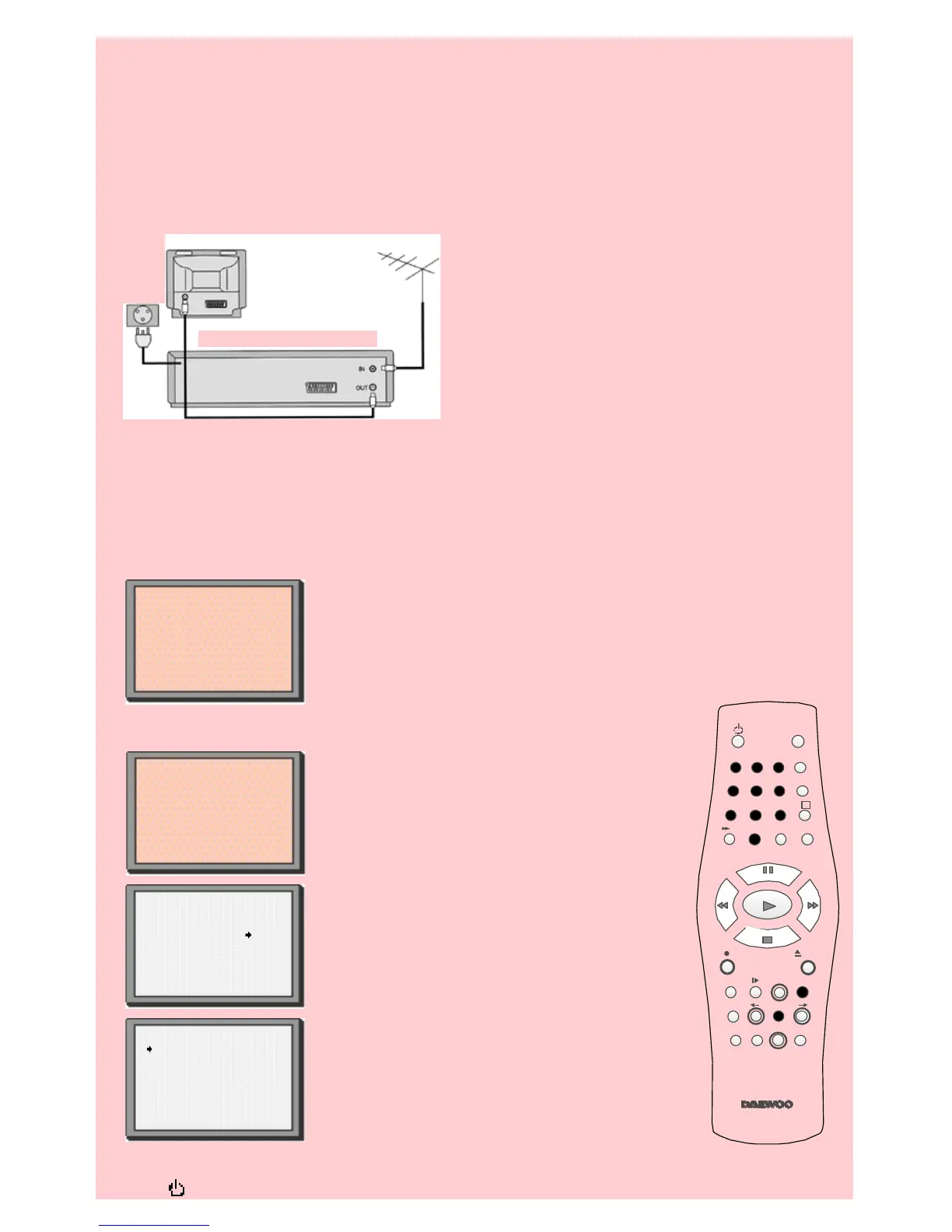
Stage 1. Connecting the video to your TV
A Fit the batteries we have provided into the remote
control. Make sure that the(+) and (-) marks on the
batteries agree with the (+) and (-) marks inside the
battery compartment.
B Plug your aerial into the ANT IN socket of the video.
C Connect the black aerial lead provided from the
ANT OUT socket of the video to your TV aerial
socket.
D Plug the video into the mains and turn it on by
pressing the POWER button. RF 52 will now be
displayed on the front of your video.
There are more details, including how to connect extra equipment, on pages 4 to 6.
Stage 2. Tuning in your TV.
A Tune a spare channel of your TV until you see the blue ‘AutoSet’ or
‘AutoSearch’ screen. Store this setting on your TV.
B If there is any distortion (lines, flickering and so on) use the number
buttons on the remote control to change RF 52 to 21. Repeat step 2A. If
there is still distortion, you should see page 7.
Stage 3. Auto Set! or Auto Search! (When you have got a clear picture)
A Point the remote control at the video and
press OK.
B The video is now tuning all the television
stations available in your area.
C If ‘Clock Set’ appears on the TV screen, please
enter the time and date. Use the number buttons
0 to 9 on the remote control. Press OK to confirm.
D When ‘Manual Set’ appears on the TV screen,
press MENU to end.
E Your video is now set up.
If you want to change station names or the
programmes they are stored on see pages 11and 12.
Important: If you switch your video off at the mains overnight you do not have to retune the settings.
Press and then MENU to restore all the settings. See page 8 to set the time and date.
Back view of your VCR
AC 230V
5 0 H z
AUTO SET or SEARCH
MENU:end
PR021
UHF ------------ ----
76%
MANUAL SET
PR01 BBC1 PRO6 P-06
PR02 BBC2 PRO7 P-07
PR03 ITV PRO8 P-08
PR04 CHA4 PRO9 P-09
PR05 SAT PR1O ----
PR+/-:select
OK:confirm MENU:end
2
3
1
4 5 6
7 8 9
0
SV/V+
TV/VCR
AV
A
Q.S
EJECT
MENUSP/LP PR
+
OK
PAL/SEC
A.SEL
PR
–
INDEX
–
+
A.D
30
Auto Set!
or Search!
OK:confirm MENU:end
OK:confirm MENU:end
AutoSet!
or Auto Search


 To Previous Page