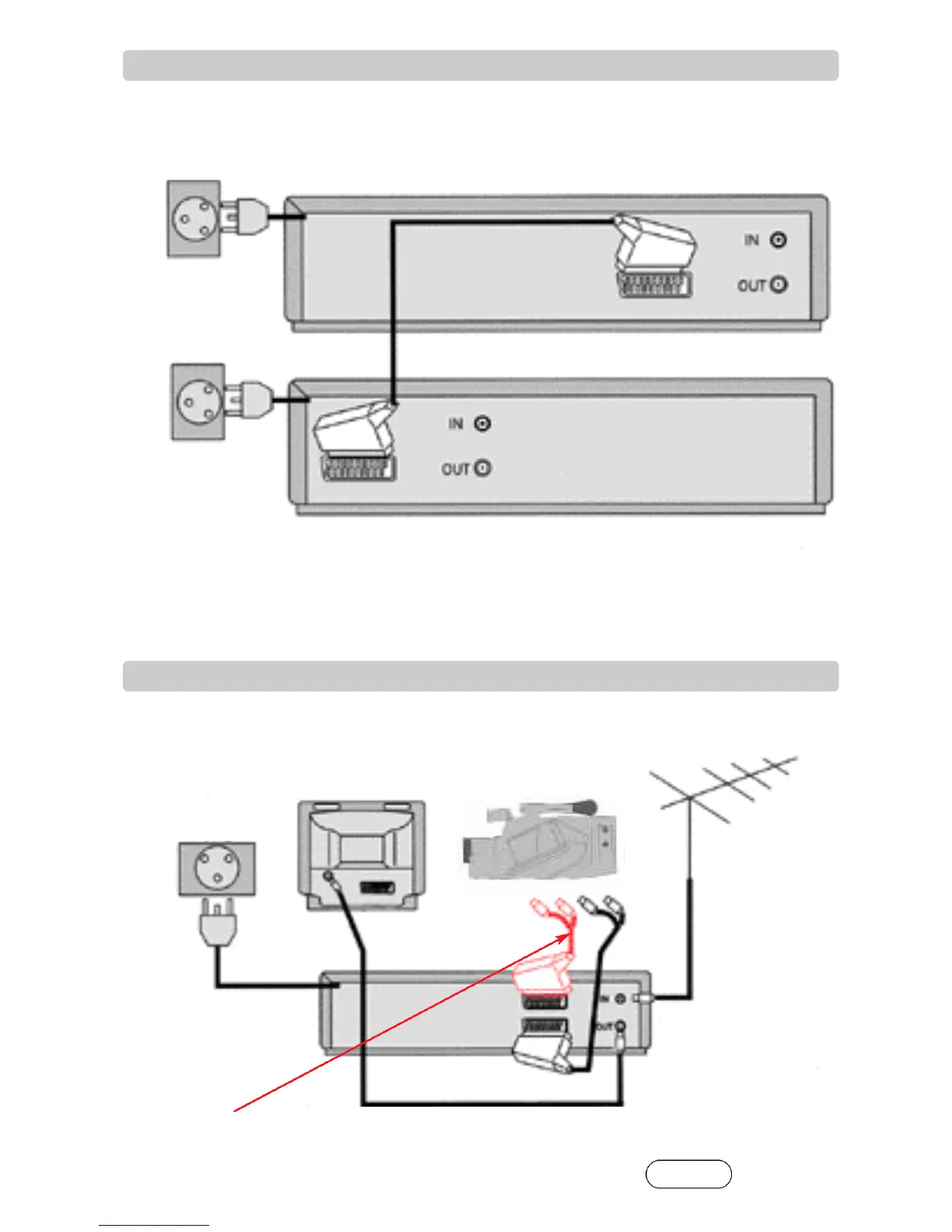
Before you start, unplug all the equipment from the mains supply.
Before you start, unplug all the equipment from the mains supply.
1) Put the tape you want to record on into the first video.
2) Put the tape you want to record from into the second video. Press the play button on the second video.
3) Press the record button on the first video.
The video will start recording.
If your video has two scart sockets, you can use the other socket to connect other equipment.
First video
Second video
Aerial
or
Television
Video
Camcorder
If you have connected your video in this way, you can also connect a scart lead from ‘AV1’ on the back panel of the video to the
television.
To use this function, see page 9.
You can also connect the camcorder by using a phono cable if your video has front input sockets . Check the
front of your video for this connection.
AC 230V
5 0 H z
AC 230V
5 0 H z
AC 230V
5 0 H z
6
7
How to connect your video to another video
How to connect your video to a camcorder
VIDEO L AUDIO R
❍
❍
❍
❍
❍
❍
6


 To Next Page