4
Before you start, unplug all the equipment from the mains supply.
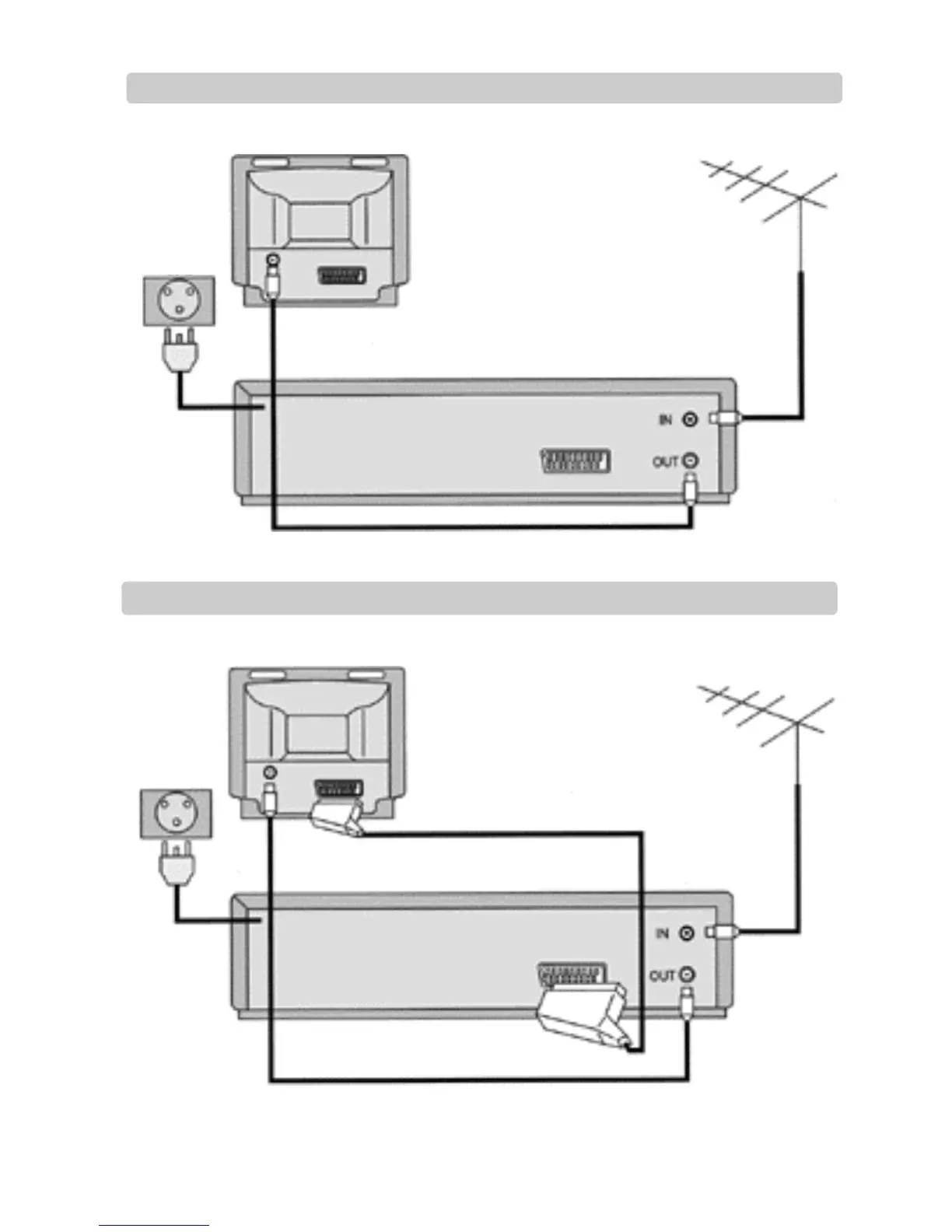
With this connection, if your video is receiving BBC1 and your TV is showing CH4, when you press the TV/VCR button on the remote control, your
TV will automatically display BBC1.
In most cases you will not be able to change channels using the controls on your TV until you turn this feature off by pressing
TV/VCR on your remote control.
Before you start, unplug all the equipment from the mains supply.
You will get better picture and sound quality if you connect your video with a scart lead.
This lead is supplied in your accessory kit.
Aerial
The type of aerial depends
on local interference and
how far you are from the
transmitter. You should
contact a local electrical
shop if you have any
questions about your aerial.
Television
Television
Aerial
Back view of your video
Scart lead (if supplied)
Back view of your video
AC 230V
5 0 H z
Setting up your video (Option 1) – Connecting your video through RF lead
Setting up your video (Option 2) – Connecting your video through a scart lead
1
2
AC 230V
5 0 H z
If you have connected your video as shown in option 1, turn to page 7.
If you have connected your video as shown in option 2, turn to page 8.
Put the batteries into the remote control. Make sure the (+) and (-) signs on the batteries agree with the (+) and (-) signs
in the battery compartment.


 To Next Page