5
Before you start, unplug all the equipment from the mains supply.
Before you start, unplug all the equipment from the mains supply
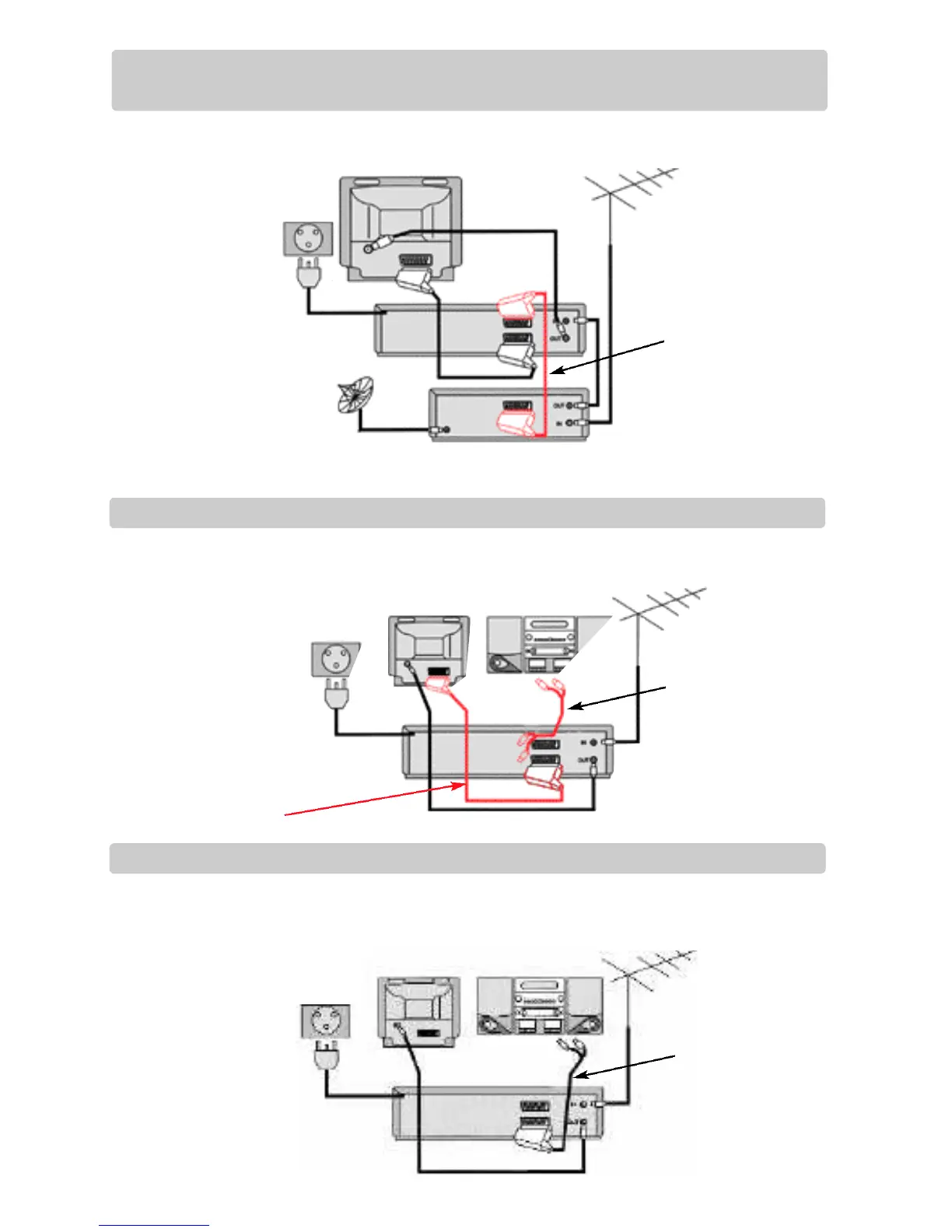
You can use this connection
if your video has two scart
sockets. This will improve
sound and picture quality
when you are recording
from satellite.
To use this function, see
page 9
Television
Television
Aerial
Hi-fi
Aerial
Video
Video
Satellite
AC 230V
5 0 H z
Television
Aerial
Hi-fi
Video
AC 230V
5 0 H z
Connecting your video through extra equipment
Connecting your video to the satellite system
Connecting your video to the hi-fi system - Option 1
Before you start, unplug all the equipment from the mains supply
Connecting your video to the hi-fi system - Option 2
Plug a phono cable into the
‘Audio L/R’ socket on the
back panel and into the
audio socket on any audio
amplifier, if needed. If your
video does not have this
conection, see below
(Option 2).
3
4
5
AC 230V
5 0 H z
L ❍
R ❍
You can also use a scart lead to improve picture and sound quality from your video.
Make sure the satellite receiver is switched to Sky One.
Plug a scart to phono cable
into the ‘AVI’ socket on the
back panel and into the
audio socket on any audio
amplifier, if needed.



 To Next Page