26 English
6-7 Resetting Filter/Element Signs
■
■■
■ Procedures for resetting filter signs
When one or more air conditioner provide filter/element signs,
clean the specified filters or elements, and then reset the filter/
element sign.
This procedure supports both the Icon and List display modes.
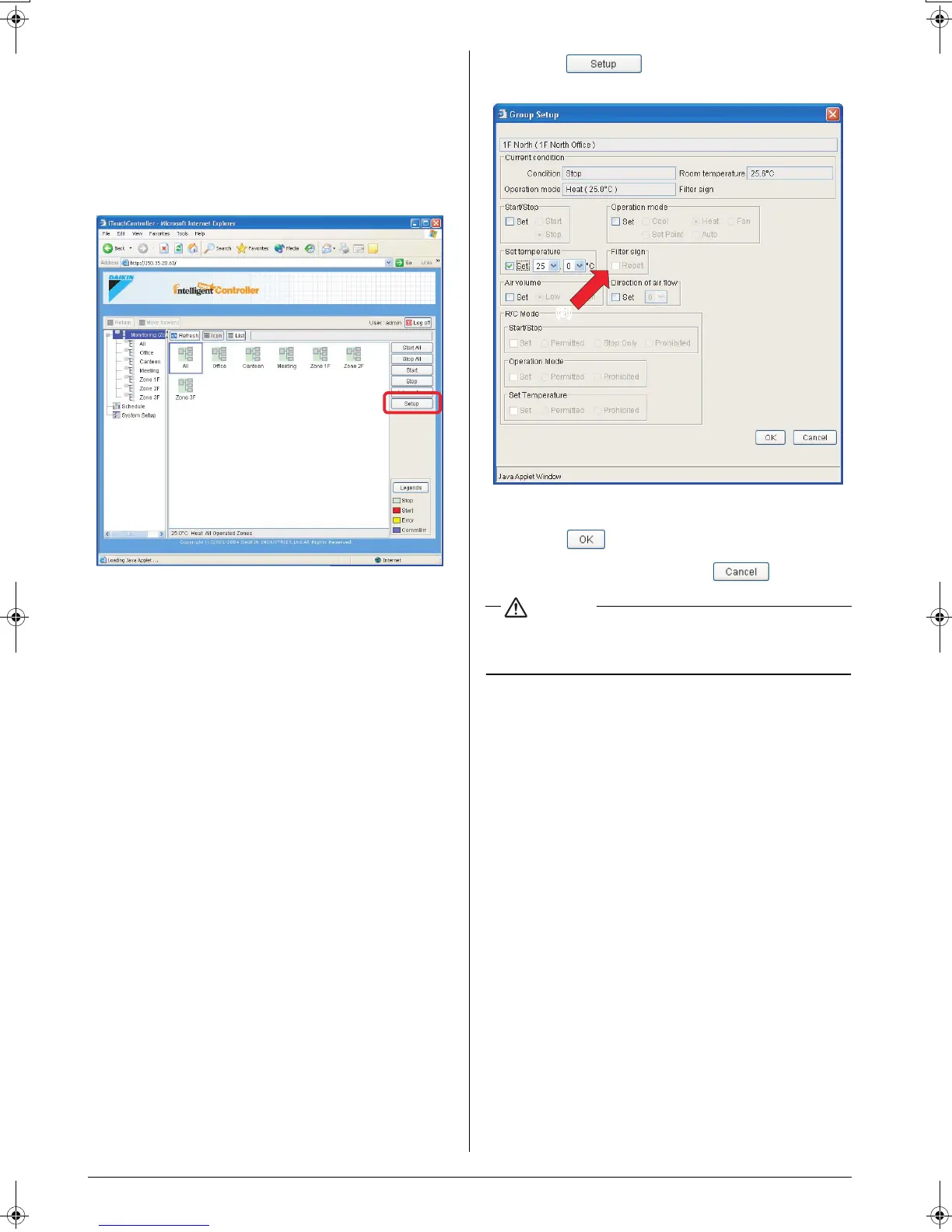
In the figure (Screen 1) the devices are displayed in the Icon dis-
play mode.
You can reset all the signs displayed on air conditioners in a
group or zone all together.
[Procedure]
1.On Screen 1 Monitoring, select a zone or a group from the
pull-down menu (1).
Select a zone or a group of which the temperature setting is
to be changed (2).
To change the setting for all the devices in a group, select the
zone including the group from the zone tree area (1), and
select the group from the main display area (2).
2.Press the . Screen 2 Operation appears.
3.Select the Reset checkbox in the Filter sign frame.
4.Press the .
To cancel the setting, press the “”.
CAUTION
In a zone setting, if one or more devices in the zone do not
provide the filter/element sign, the Reset checkbox is grayed
out.
(1)
(2)
Screen 1: Main screen
(3)
Screen 2: Setup screen
01_EM04A057_EN.fm Page 26 Tuesday, February 1, 2005 7:47 PM












 To Next Page