English 49
Problems Possible Reasons and Solutions
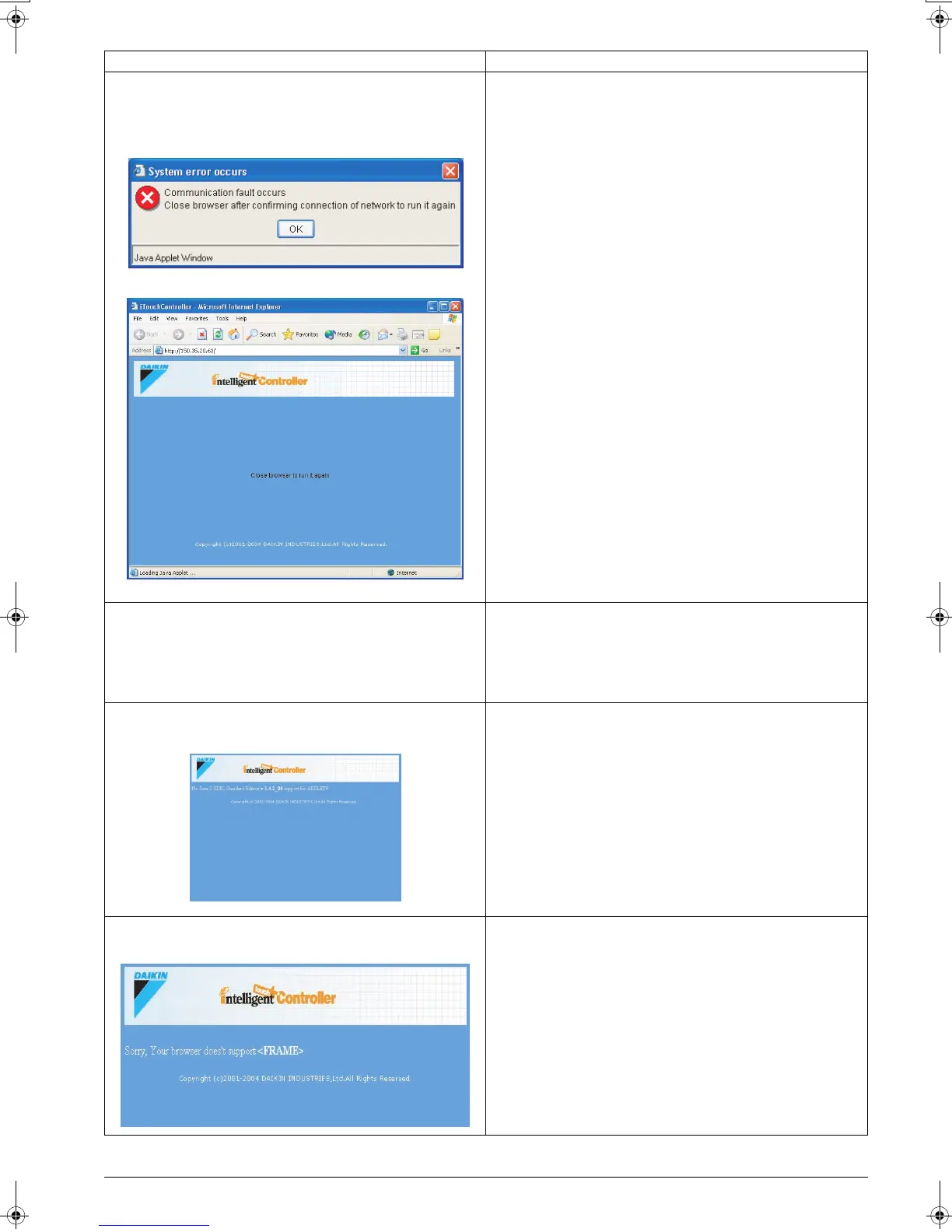
The following dialog box appears stating that a communica-
tion error occurred, and I cannot operate the air condition-
ers from my PC.
The most likely causes are:
1. Your PC is not cabled correctly to the intelligent Touch Con-
troller.
2.The intelligent Touch Controller is turned off.
Clicking the OK button on the dialog box (Screen 1) displays the
Screen 2. Close your browser software and then restart it.
I cannot access the intelligent Touch Controller
web interface.
• Your PC is not correctly connected to the network.
• The intelligent Touch Controller address entered in the
browser is incorrect.
• The intelligent Touch Controller is turned off.
• The network is congested for any reason. In this case wait for
a while and then access it again.
When accessing the intelligent Touch Controller web
interface, the following screen appears.
• This message informs you that Java plugin is not installed or
the version of the installed Java plugin is not supported.
Install the correct version of Java plugin. Refer to “BEFORE
STARTING” for more information. (See page 3)
When accessing the intelligent Touch Controller web
interface, the following screen appears.
• This message informs you that your browser does not support
the frame function.
Check you browser’s specifications. Refer to “BEFORE
STARTING” for more information. (See page 3)
Screen 1:
Screen 2:
01_EM04A057_EN.fm Page 49 Tuesday, February 1, 2005 7:47 PM












 To Next Page