8 Commissioning
Installation manual
44
EBSH/X(B)11+16P50D
Daikin Altherma 3 R ECH₂O
4P759878-1 – 2024.01
8.2.1 To check the minimum flow rate
1 Check the hydraulic configuration to find out which
space heating loops can be closed by mechanical,
electronic, or other valves.
—
2 Close all space heating loops that can be closed. —
3 Start the pump test run (see "8.2.4To perform an
actuator test run"[444]).
—
4 Read out the flow rate
(a)
. If the flow rate is too low:
▪ Do air purge.
▪ Check the function of the valve motor of M1S and
M2S. Replace the valve motor if necessary.
—
(a)
During pump test run, the unit can operate below the minimum
required flow rate.
If operation is… Then the minimum required
flow rate is…
Cooling 16l/min
Heating/defrost 22l/min
8.2.2 To perform an air purge
Conditions: Make sure all operation is disabled. Go to [C]:
Operation and turn off Space heating/cooling and Tank
operation.
1 Set the user permission level to Installer. See "To
change the user permission level"[434].
—
2 Go to [A.3]: Commissioning > Air purge.
3 Select OK to confirm.
Result: The air purge starts. It stops automatically
when air purge cycle is finished.
To stop the air purge manually: —
1 Go to Stop air purge.
2 Select OK to confirm.
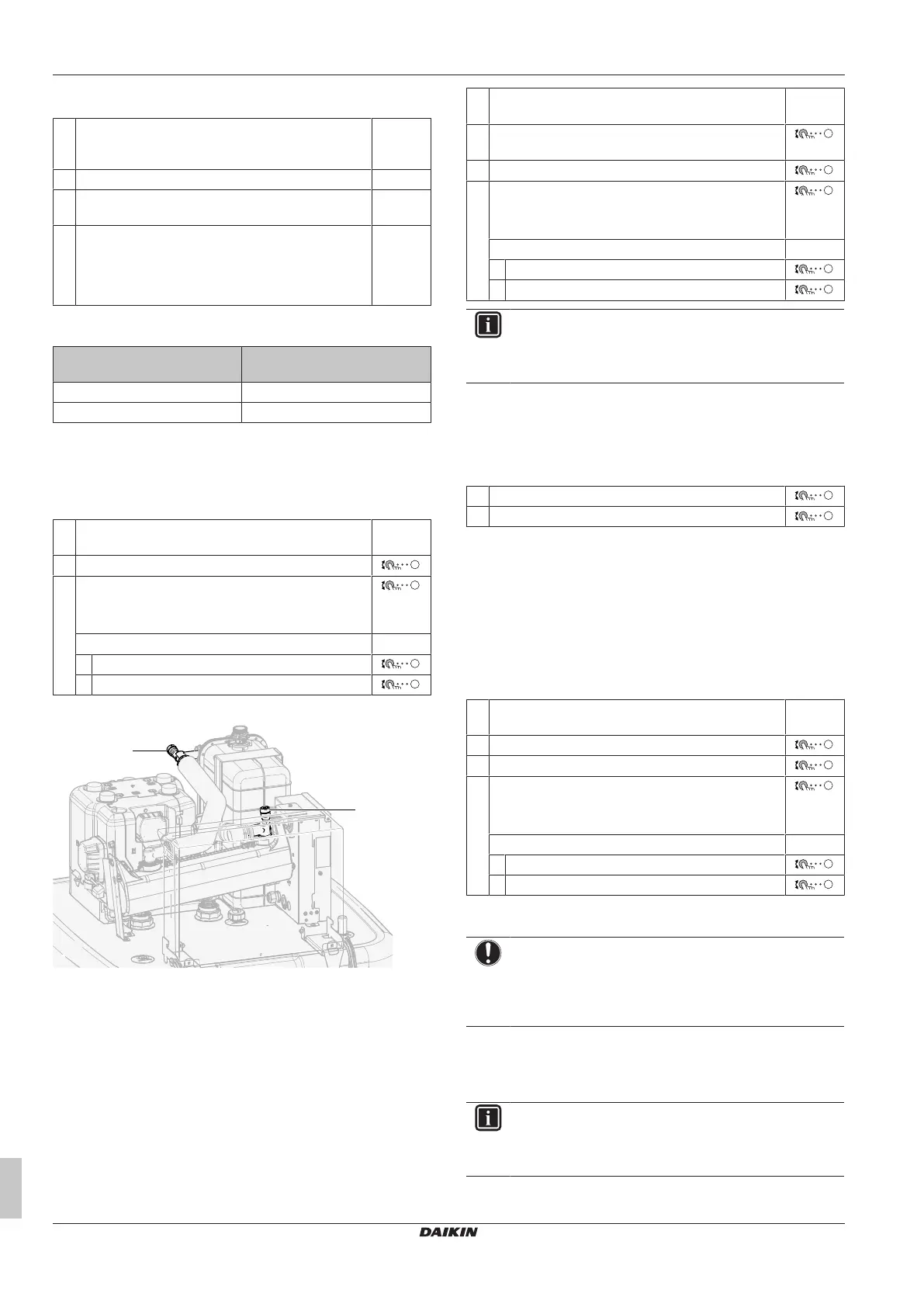
To purge the air out of the unit with the manual air vent valves
a, b Manual air vent valve
1 Connect a hose to the manual air vent valve a. Direct the free
end away from the unit.
2 Open the valve by turning until no more air escapes, then close
it again.
3 In case that an option backup heater is installed, repeat step1
and 2 for valveb.
8.2.3 To perform an operation test run
Conditions: Make sure all operation is disabled. Go to [C]:
Operation and turn off Space heating/cooling and Tank
operation.
1 Set the user permission level to Installer. See "To
change the user permission level"[434].
—
2 Go to [A.1]: Commissioning > Operation test
run.
3 Select a test from the list. Example: Heating.
4 Select OK to confirm.
Result: The test run starts. It stops automatically
when ready (±30min).
To stop the test run manually: —
1 In the menu, go to Stop test run.
2 Select OK to confirm.
INFORMATION
If the outdoor temperature is outside the range of
operation, the unit may NOT operate or may NOT deliver
the required capacity.
To monitor leaving water and tank temperatures
During test run, the correct operation of the unit can be checked by
monitoring its leaving water temperature (heating/cooling mode) and
tank temperature (domestic hot water mode).
To monitor the temperatures:
1 In the menu, go to Sensors.
2 Select the temperature information.
8.2.4 To perform an actuator test run
Purpose
Perform an actuator test run to confirm the operation of the different
actuators. For example, when you select Pump, a test run of the
pump will start.
Conditions: Make sure all operation is disabled. Go to [C]:
Operation and turn off Space heating/cooling and Tank
operation.
1 Set the user permission level to Installer. See "To
change the user permission level"[434].
—
2 Go to [A.2]: Commissioning > Actuator test run.
3 Select a test from the list. Example: Pump.
4 Select OK to confirm.
Result: The actuator test run starts. It stops
automatically when ready (±30min).
To stop the test run manually: —
1 In the menu, go to Stop test run.
2 Select OK to confirm.
Possible actuator test runs
NOTICE
For the backup heater test run, make sure that at least one
of the two mixing valves of the unit is open during the test.
Otherwise the thermal cut-out of the backup heater may be
triggered.
▪ Backup heater 1 test
▪ Backup heater 2 test
▪ Pump test
INFORMATION
Make sure that all air is purged before executing the test
run. Also avoid disturbances in the water circuit during the
test run.
▪ Shut off valve test



 To Next Page