5 Application guidelines
Installer reference guide
20
ERGA04~08DAV3(A) + EHBH/X04+08DA
Daikin Altherma – Low temperature split
4P496758-1 – 2017.12
5.6 Setting up the power consumption
control
▪ The power consumption control:
▪ Allows you to limit the power consumption of the entire system
(sum of outdoor unit, indoor unit, backup heater and optional
booster heater).
▪ Configuration: Set the power limitation level and how it has to
be achieved via the user interface.
▪ The power limitation level can be expressed as:
▪ Maximum running current (inA)
▪ Maximum power input (inkW)
▪ The power limitation level can be activated:
▪ Permanently
▪ By digital inputs
5.6.1 Permanent power limitation
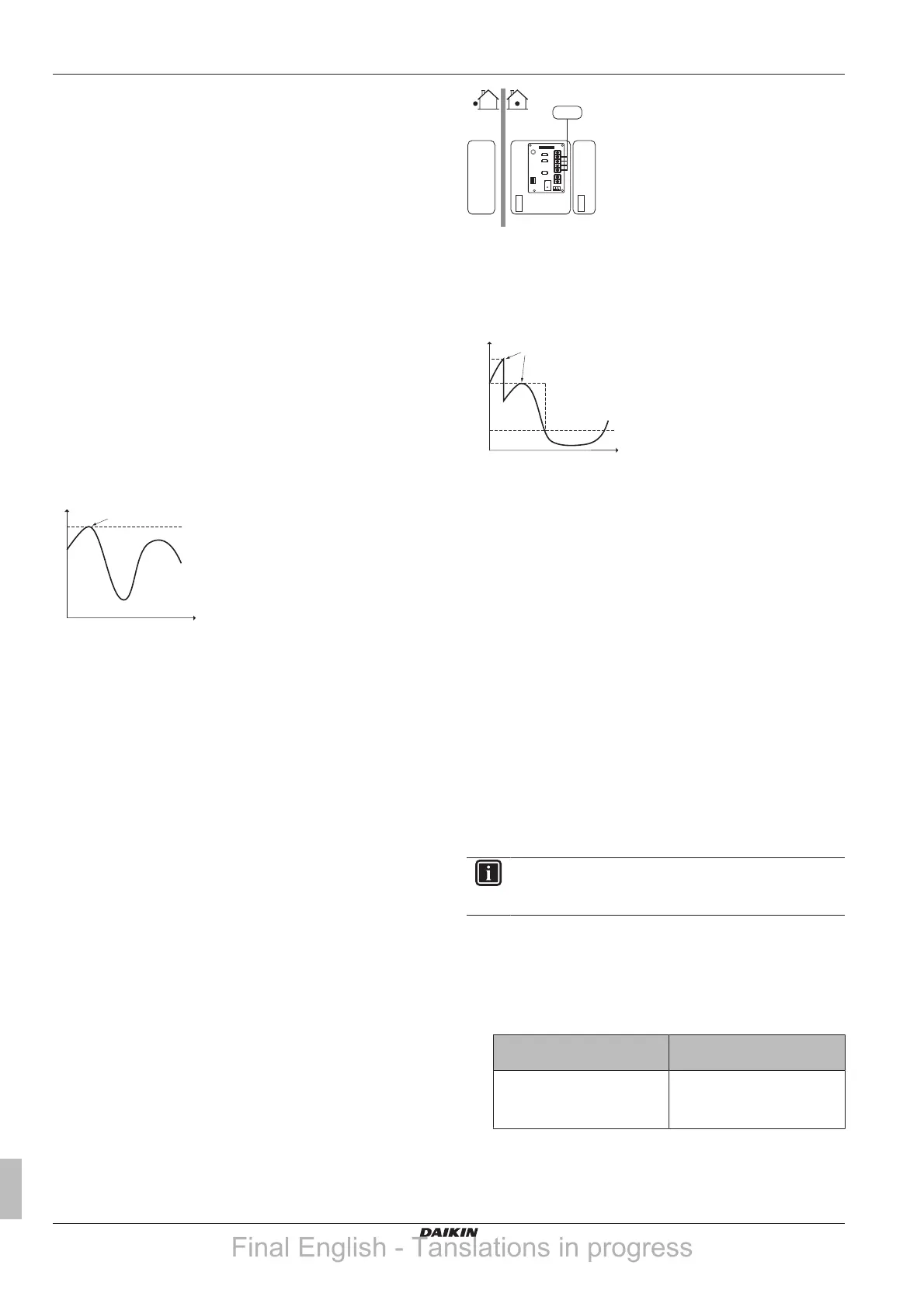
Permanent power limitation is useful to assure a maximum power or
current input of the system. In some countries, legislation limits the
maximum power consumption for space heating and DHW
production.
P
i
Power input
t Time
DI Digital input (power limitation level)
a Power limitation active
b Actual power input
Setup and configuration
▪ No additional equipment needed.
▪ Set the power consumption control settings in [9.9] via the user
interface (for the description of all settings, see
"8Configuration"on page46):
▪ Select continuous limitation mode
▪ Select the type of limitation (power in kW or current in A)
▪ Set the desired power limitation level
5.6.2 Power limitation activated by digital
inputs
Power limitation is also useful in combination with an energy
management system.
The power or current of the entire Daikin system is limited
dynamically by digital inputs (maximum four steps). Each power
limitation level is set via the user interface by limiting one of the
following:
▪ Current (in A)
▪ Power input (in kW)
The energy management system (field supply) decides the activation
of a certain power limitation level. Example: To limit the maximum
power of the entire house (lighting, domestic appliances, space
heating…).
A Outdoor unit
B Indoor unit
C DHW tank
D Energy management system
a Power limitation activation (4 digital inputs)
b Backup heater
c Booster heater
P
i
Power input
t Time
DI Digital inputs (power limitation levels)
a Power limitation active
b Actual power input
Setup
▪ Demand PCB (option EKRP1AHTA) needed.
▪ Maximum four digital inputs are used to activate the
corresponding power limitation level:
▪ DI1 = weakest limitation (highest energy consumption)
▪ DI4 = strongest limitation (lowest energy consumption)
▪ For the specifications of the digital inputs, and for where to
connect them, refer to the wiring diagram.
Configuration
▪ Set the power consumption control settings in [9.9] via the user
interface (for the description of all settings, see
"8Configuration"on page46):
▪ Select limitation by digital inputs.
▪ Select the type of limitation (power in kW or current in A).
▪ Set the desired power limitation level corresponding to each
digital input.
INFORMATION
In case more than 1 digital input is closed (at the same
time), the digital input priority is fixed: DI4 priority>…>DI1.
5.6.3 Power limitation process
The outdoor unit has better efficiency than the electrical heaters.
Therefore, the electrical heaters are limited and turned OFF first.
The system limits power consumption in the following order:
1 Limits certain electrical heaters.
If… has priority Then set the priority heater
via the user interface to…
Domestic hot water production Booster heater (if applicable)
Result: The backup heater will
be turned OFF first.
Final English - Tanslations in progress




 To Next Page