8 Configuration
Installer reference guide
51
ERGA04~08DAV3(A) + EHBH/X04+08DA
Daikin Altherma – Low temperature split
4P496758-1 – 2017.12
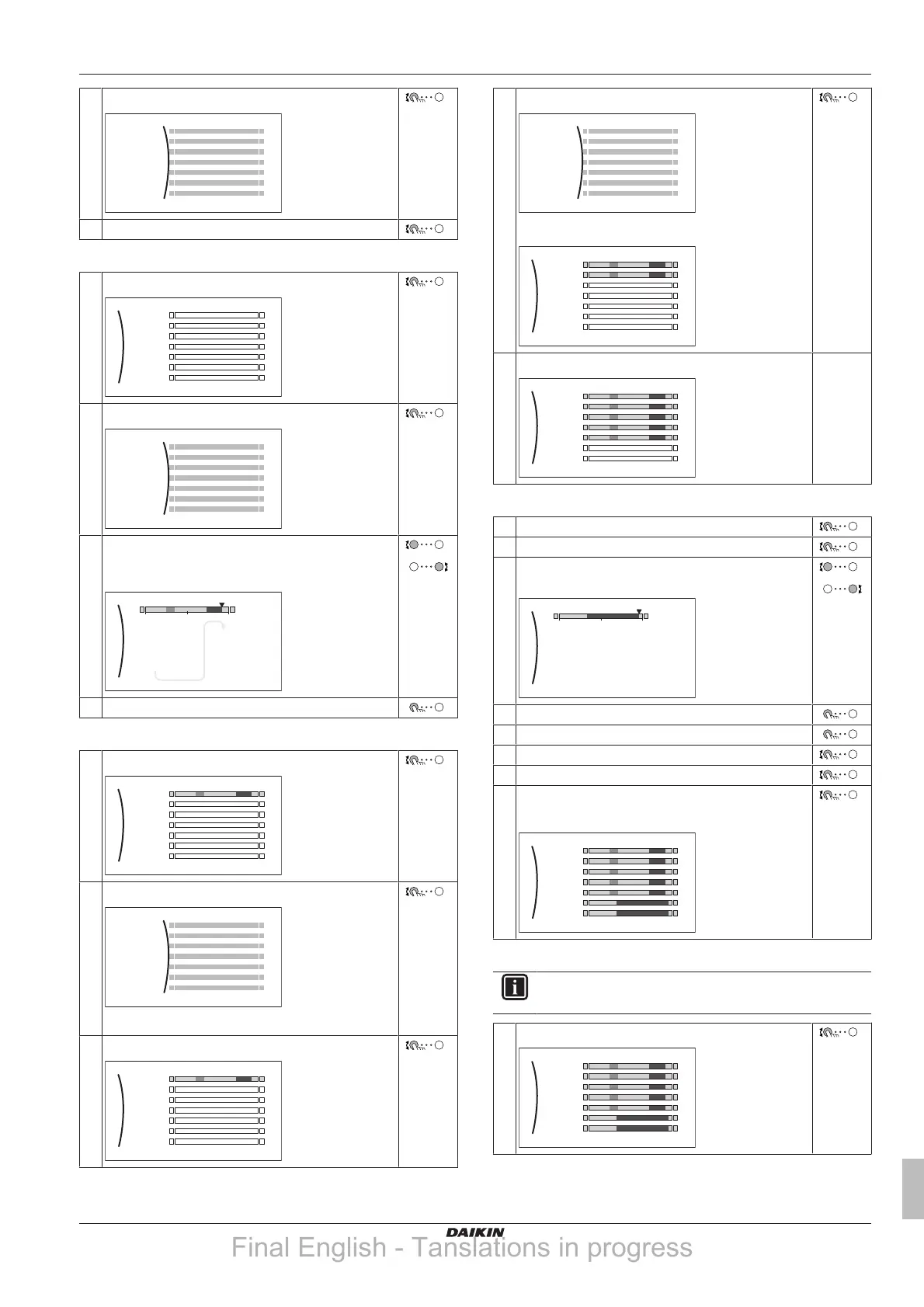
2 Select Delete.
3 Select OK to confirm.
To program the schedule for Monday:
1 Select Monday.
Mon
Sat
Wed
Fri
Thu
Tue
Sun
User defined 1
2 Select Edit.
3 Use the left dial to select an entry and edit the entry
with the right dial. You can program up to 6 actions
each day.
0
6:00
8:30
17:30
20°C
18°C
22:00
--:--
18°C
--
21°C
12 24
4 Confirm the changes.
To copy the schedule to the other weekdays:
1 Select Monday.
Mon
Sat
Wed
Fri
Thu
Tue
Sun
User defined 1
2 Select Copy.
Result: "C" is displayed next to the copied day.
3 Select Tuesday.
Mon
Sat
Wed
Fri
Thu
Tue
Sun
User defined 1
C
4 Select Paste.
Result:
Mon
Sat
Wed
Fri
Thu
Tue
Sun
User defined 1
C
5 Repeat this action for all other weekdays.
Mon
Sat
Wed
Fri
Thu
Tue
Sun
User defined 1
C
—
To program the schedule for Saturday and copy it to Sunday:
1 Select Saturday.
2 Select Edit.
3 Use the left dial to select an entry and edit the entry
with the right dial.
0
8:00
23:00
--:--
21°C
18°C
--
12 24
4 Confirm the changes.
5 Select Saturday.
6 Select Copy.
7 Select Sunday.
8 Select Paste.
Result:
Mon
Sat
Wed
Fri
Thu
Tue
Sun
User defined 1
C
To rename the schedule:
INFORMATION
Not all schedules can be renamed.
1 Select the name of the current schedule.
Mon
Sat
Wed
Fri
Thu
Tue
Sun
User defined 1
Final English - Tanslations in progress





 To Next Page