Installation and operation manual
2
FWEC2
Advanced electronic controller
FC66002764
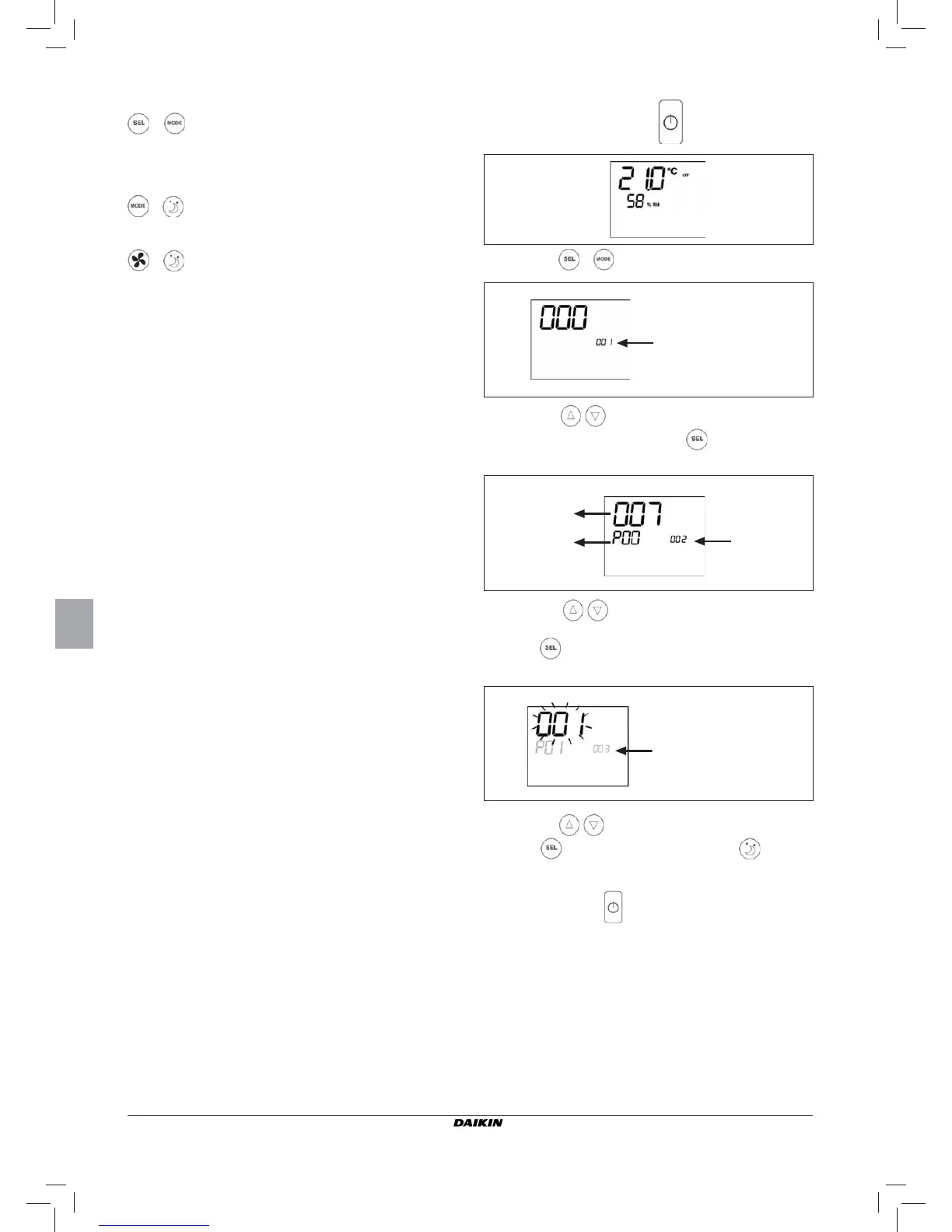
ACTIVE KEY COMBINATIONS
With OFF thermostat: access to the parameter confi guration
procedure
With ON thermostat: display of current water temperature
Selection of Minimum air temperature function
Selection of dehumidify option
BOARD CONFIGURATION
The board can be confi gured according to the type of unit/
system to be governed by changing some parameters.
PARAMETER LIST
■
P00 = controller configuration (see “Available
confi gurations”) to select the type of unit to be managed.
■ P01 = type of controller installation
-000: on the unit
-001: wall mounted
■ P02 = Modbus address (in order for the change in this
parameter to become active (excepting in the case of
internal transfer between values, it is necessary to switch the
power off and back on again at the end of programming)
-0: serial communication disabled
-1-247: slave
-255: master
■ P03 = neutral zone [20-50°C/10]; parameter used in case of
confi gurations with automatic cooling/heating changeover
according to air temperature.
■ P04 = water sensor
-0: not available
-1: available
Based on the set value, the sensor alarm and the electrical
heater functions will be controlled
■ P05 = Confi guration logic for use of digital inputs 1 and
2:
- 0: DIN1 = - DIN2 = -
- 1: DIN1 = - DIN2 = OnOff
- 2: DIN1 = Sum/Win DIN2 = -
- 3: DIN1 = Eco DIN2 = -
- 4: DIN1 = Sum/Win DIN2 = On/Off
- 5: DIN1 = Eco DIN2 = On/Off
- 6: DIN1 = Sum/Win DIN2 = Eco
■ P06 = logic for use of digital input 1:
- 0: [open/closed] = [Cooling/Heating] = [-/ECO]
- 1: [open/closed] = [Heating/Cooling] = [ECO/-]
■ P07 = logic for use of digital input 2:
- 0: [open/closed] = [OFF/ON] = [-/ECO]
- 1: [open/closed] = [On/Off] = [ECO/-]
■ P08 = Remote humidity sensor
- 0 : not available
- 1 : available
Based on the set value, the associated probe alarm will
be triggered accordingly.
PARAMETER CONFIGURATION PROCEDURE
■ Switch the thermostat OFF
■ Push the keys at the same time
■ Use keys to modify the display value up to the
password value “10”, and press .
If it is correct, you will have access to the parameters
■ Use keys to scroll the various parameters (see
“Parameter list” described above)
■ Press to confi rm the parameter change (the value will
start fl ashing)
■ use keys to change the value
■ Press to save the new value setting or to cancel
the modifi cation
■ After completing the modifi cation of the parameters con-
cerned press key to exit the procedure
N.B.: the parameter confi guration phase is of limited duration.
Once a certain time has elapsed (around 2 minutes) the
thermostat will switch back into the Off status and only
the saved changes will be retained.
level indication :
002= parameter
selection
Value of selected
parameter
Selected
parameter P...
level indication:
003 = edit parameter
level indication:
001
= password entry


 To Next Page